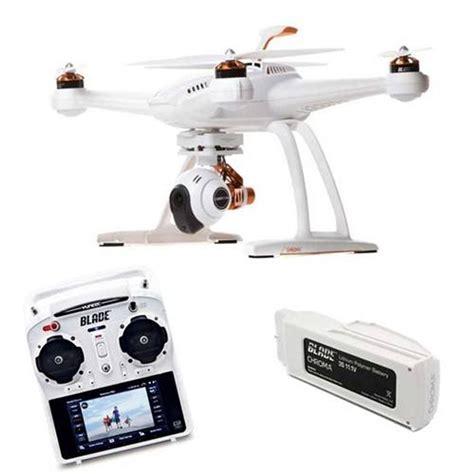
The Blade Chroma 4K, emerging from the collaborative efforts of Horizon Hobby and Yuneec, presents itself as a compelling option in the competitive camera drone market. Essentially a thoughtfully redesigned iteration of the well-regarded Yuneec Typhoon Q500 4K, the Chroma 4K aims to deliver a similar high-quality aerial photography experience but in a more compact and arguably more travel-friendly package. It inherits the core functionalities, the impressive ST10+ all-in-one controller with its integrated touchscreen, and the capable CGO3 4K-resolution camera stabilized by a three-axis gimbal. This review delves deep into every facet of the Blade Chroma 4K, examining its design, flight characteristics, camera performance, and overall value proposition for both novice and experienced drone enthusiasts seeking a reliable eye in the sky.
Upon unboxing the Blade Chroma 4K, the immediate impression is one of completeness and readiness. Unlike some drones that require intricate assembly, the Chroma arrives virtually ready to fly. The primary components – the quadcopter itself, the ST10+ controller, a high-capacity flight battery, two full sets of propellers (a thoughtful inclusion), a battery charger, and a sunshield for the controller’s screen – are all neatly packaged. The initial setup is refreshingly straightforward: charge the flight battery and the controller, spin on the self-tightening propellers (which are conveniently color-coded for correct placement), slide in the battery, and you’re essentially prepared for your first flight. This ease of entry is a significant boon for users who may be new to the world of advanced camera drones and prefer to minimize setup complexities.
Blade Chroma 4K: Design, Portability, and Build Quality
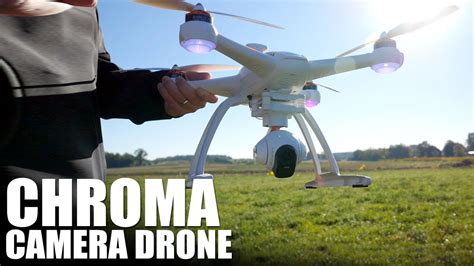
The design of the Blade Chroma 4K marks a significant departure from its larger Yuneec Typhoon Q500 4K sibling, leaning towards a more compact and manageable form factor. With a diagonal motor-to-motor distance of 400mm, it positions itself closer in size to DJI’s popular Phantom 3 series (390mm) rather than the more expansive Typhoon (510mm). This reduction in size, coupled with a weight of 2.9 pounds (1.3kg), a considerable portion of which is the robust 6,300mAh LiPo battery, contributes significantly to its portability. The chassis, primarily constructed from durable white plastic, might not exude the same premium feel as some of its metallic-accented competitors, but its more compact nature lends it a sense of sturdiness and resilience. It feels less unwieldy than the Typhoon, making it easier to handle both on the ground and in transit.
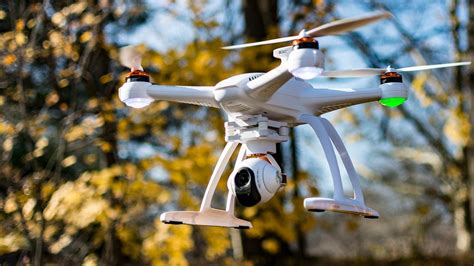
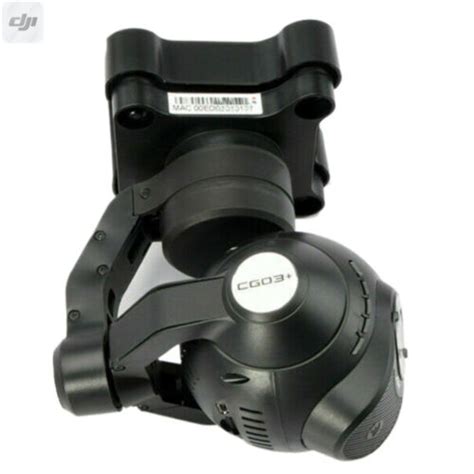
One of the standout design features of the Chroma 4K is its exceptional travel-friendliness. Horizon Hobby has clearly prioritized ease of disassembly and transport. The color-coded, self-tightening propellers can be spun off with minimal effort, requiring no tools. The landing gear, a somewhat gangly but effective structure, unclips from the main body with simple latches. Perhaps most impressively, the entire CGO3 camera and gimbal assembly can be detached by disconnecting a single power cable and releasing another clip located in front of the gimbal, allowing it to slide off smoothly. This modularity means all the essential components, including the drone, the ST10+ controller, batteries, and accessories, can be comfortably stowed in a large messenger bag or a dedicated drone backpack, a significant advantage for pilots who frequently travel or hike to their flying locations. Furthermore, for those concerned about potential crash damage, Horizon Hobby offers comprehensive support with readily available spare parts, making repairs relatively straightforward. And for users looking to personalize their drone, adhesive skins are available to alter its appearance from the standard white finish.
The ST10+ Ground Station: Integrated Control and First-Person View
A cornerstone of the Blade Chroma 4K’s user experience is the included Yuneec ST10+ personal ground station. This controller distinguishes itself by integrating a vibrant 5.5-inch Android-based touchscreen display directly into its body. This eliminates the common reliance on a separate smartphone or tablet for a first-person view (FPV) from the drone’s camera and for accessing critical flight telemetry. The convenience of having an all-in-one unit cannot be overstated; it means one less device to charge, carry, and connect. The screen provides a live video feed, albeit with a slight perceptible lag, and displays essential data such as altitude, speed, distance, battery levels, and GPS status. While the ultrawide-angle lens of the CGO3 camera can make judging distances solely through the FPV feed challenging, the screen is invaluable for framing shots and maintaining situational awareness. The fixed screen size, however, means users cannot opt for a larger tablet display, which might be preferred by some for more detailed flight planning, though the Chroma’s lack of waypoint navigation somewhat mitigates this concern.
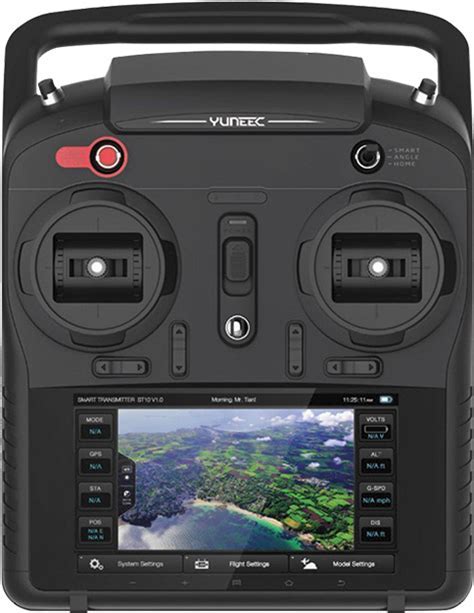
The ST10+ is ergonomically designed and features a comprehensive set of physical controls. Dedicated buttons allow for instant starting and stopping of video recording and capturing still photographs. Two prominent sliders are positioned for intuitive control: one adjusts the camera’s tilt angle, allowing for smooth cinematic pans up or down, while the other can be used to limit the overall climb/descend rate and directional speed, offering finer control for precise maneuvering. A clearly marked three-position switch allows pilots to easily toggle between the primary flight modes: Smart, Angle, and Home. This combination of touchscreen interface and tactile physical controls offers a balanced and user-friendly command experience.
Navigating the Skies: Flight Modes and Intelligent Capabilities
The Blade Chroma 4K offers several flight modes designed to cater to different skill levels and operational needs, though it notably lacks some of the more advanced autonomous features found in direct competitors. The primary modes are Smart Mode, Angle Mode, and Home Mode.
Smart Mode is specifically tailored for beginners. When activated, it establishes a virtual safety barrier, known as a geofence, preventing the drone from flying more than 330 feet (100 meters) away from the pilot. More significantly, in Smart Mode, the drone’s movement is always relative to the pilot’s right-hand control stick inputs, regardless of which way the drone’s nose is pointing. Push the stick right, and the drone flies right from the pilot’s perspective. While this can be helpful for absolute novices to get a feel for basic flight dynamics, it’s generally recommended not to rely on it exclusively. Smart Mode is heavily dependent on a strong GPS signal; if GPS is lost, the pilot would need to manually control the drone in Angle Mode, which could be disorienting if they haven’t practiced it. Crucially, Smart Mode is the gateway to two of the Chroma’s key intelligent flight features: Follow Me and Tracking Mode. In Follow Me, the drone utilizes the GPS signal from the ST10+ controller to autonomously follow whoever is carrying it, maintaining a pre-set altitude and distance. Tracking Mode operates similarly, but its objective is to keep the controller (and thus the person holding it) framed within the camera’s view, with the camera automatically tilting as needed. These features work reasonably well in open areas but are subject to the precision of GPS.
Angle Mode (often referred to as Pilot Mode) is the standard flight mode for most experienced users. In this mode, the drone’s movements are relative to its nose – push the right stick forward, and the drone flies in the direction its nose is pointing. As long as the Chroma 4K has a lock on six or more GPS satellites, it will exhibit excellent stability, automatically holding its position and altitude when the control sticks are centered. For pilots desiring full manual control without GPS assistance, GPS can be deactivated through the controller’s touchscreen settings. This is generally only recommended for highly experienced pilots or when attempting to fly indoors where GPS signals are unavailable. It’s important to note that the Blade Chroma 4K lacks a dedicated visual positioning system (VPS), which typically consists of downward-facing cameras and ultrasonic sensors. Competing drones like the DJI Phantom 3 series and Parrot Bebop 2 utilize VPS to maintain stability and position hold indoors or at low altitudes when GPS is weak or absent. The absence of VPS on the Chroma means indoor flight relies solely on pilot skill, and low-altitude hovering outdoors without strong GPS can be less precise.
Home Mode serves as the drone’s return-to-home (RTH) safety feature. By flipping the designated switch, and provided the drone has a solid GPS lock and a clear flight path, it will autonomously fly back to a point within approximately 13 to 26 feet (4-8 meters) of the pilot’s (or controller’s) last known position and initiate an automatic landing. This is a valuable feature for quickly retrieving the drone or in situations where visual line of sight might be compromised.
For users seeking even more discreet operation of the Follow Me and Tracking features, the Chroma 4K is also compatible with Yuneec’s Wizard remote control. This ultra-compact, TV remote-sized device allows for full control of the drone using simple gestures and a directional pad. It also incorporates its own GPS, enabling the Follow Me and Tracking functions without the need to carry the bulkier ST10+ controller, which can be awkward when trying to capture footage of oneself.
Blade Chroma 4K In-Flight: Stability, Responsiveness, and Endurance
Preparing the Blade Chroma 4K for flight is an exercise in simplicity. Once the propellers are attached and the batteries for both the drone and the ST10+ controller are charged, the pre-flight sequence is swift. The Android-based ST10+ controller takes about a minute to boot up. After powering on the drone, it takes another minute or so for the controller and aircraft to establish a secure connection. GPS satellite acquisition, essential for features like position hold and return-to-home, can take a little longer, typically a couple of minutes in total until a lock on six or more satellites is achieved. While there’s no automatic takeoff function, initiating flight is straightforward: press and hold a dedicated button on the controller to arm the motors, then gently push up on the left stick to ascend. Similarly, there’s no one-touch automatic landing button, but engaging Home Mode will achieve an automated landing. Manually landing is also quite easy, though the drone can exhibit a slight bounce when close to the ground due to prop wash.
In the air, particularly with a strong GPS lock, the Blade Chroma 4K is a remarkably stable and easy-to-fly quadcopter. It’s not designed to be a racing drone; its movements are measured and deliberate, even at full throttle. This restrained flight characteristic is actually a significant advantage for its intended purpose: capturing smooth, cinematic aerial video. The drone handles moderate wind conditions commendably, maintaining its position well. For optimal performance and safety, particularly when flying in new locations, calibrating the drone’s compass before flight is highly recommended. Horizon Hobby provides helpful video tutorials for this procedure and other operational aspects. The Follow Me and Tracking modes perform adequately in open spaces, but their GPS-based nature means they aren’t always pinpoint accurate. The drone won’t stop instantaneously or change directions rapidly in these modes, and it doesn’t automatically adjust its altitude to follow terrain changes – if you’re moving uphill, you’ll need to manually increase the drone’s altitude or start with it set higher. Critically, the Chroma 4K lacks any form of obstacle avoidance, so using these autonomous modes requires vigilance and wide-open environments.
Flight times are a crucial consideration for any drone pilot. Horizon Hobby officially lists flight times of up to 30 minutes for the Chroma 4K. However, in real-world testing, flights typically averaged around 20 minutes before the controller issued low-battery warnings prompting a landing. This 20-minute mark is fairly standard for drones in this category at the time of its release. It’s possible the 30-minute figure might be achievable under ideal conditions, perhaps with the camera and landing gear removed and minimal maneuvering. Extra batteries, a near-essential purchase for serious users, are priced at approximately $100 each.
Capturing the World from Above: CGO3 Camera and 4K Video Quality
The Blade Chroma 4K is equipped with the Yuneec CGO3 camera-and-gimbal system, a unit capable of capturing impressive aerial visuals. The camera offers several video resolution options, topping out at 4K Ultra HD (3840×2160 pixels) at 30 frames per second (fps). For those interested in slow-motion effects, it can also record Full HD (1920×1080 pixels) at a high frame rate of 120fps. While high resolution is a key specification, the actual image quality is what truly matters. The CGO3 records video at a respectable bit rate of 50Mbps, which contributes to good fine detail rendition and overall sharpness in the footage. Users can select from a few different color profiles. The “Gorgeous” mode tends to boost contrast and saturation significantly, sometimes resulting in an oversharpened and overly vibrant look. The “Natural” color mode, by contrast, delivers a more subdued and truer-to-life color reproduction, generally preferred for post-production flexibility. The integrated three-axis motorized gimbal does an excellent job of stabilizing the camera, ensuring that footage remains smooth and free of jarring movements, even if the drone itself is buffeted by wind or making less-than-perfect maneuvers. Some minor rolling shutter artifacts, common in this class of camera, can occasionally be visible during rapid movements or in high-vibration scenarios. Generally, the video output from the CGO3 is best appreciated when viewed on smaller screens, such as tablets and smartphones, or when shared online. For these purposes, it can produce excellent and engaging clips.
Support, Maintenance, and Overall User Experience
Beyond its flight and camera capabilities, the Blade Chroma 4K benefits greatly from the backing of Horizon Hobby, known for its strong customer support and extensive parts availability. This is a significant advantage, as drones, especially those flown by less experienced pilots, can inevitably encounter mishaps. Knowing that spare propellers, landing gear, motors, or even entire body shells are readily obtainable provides peace of mind and can significantly extend the operational life of the drone. The relative simplicity of the Chroma’s design also lends itself to easier repairs compared to some more intricately constructed models. The overall user experience, from unboxing and setup to flight and content creation, is geared towards ease of use, making it an accessible platform for a wide range of users.
Final Verdict: Is the Blade Chroma 4K the Aerial Companion for You?
The Blade Chroma 4K stands out as a user-friendly and competent camera drone that excels in portability and ease of operation. Its smooth flight characteristics, the convenience of the all-in-one ST10+ controller, and the reliable 4K CGO3 camera make it a pleasure to fly and capture aerial footage with. The readily available parts and commendable customer support from Horizon Hobby are also significant plus points. However, it’s not without its limitations. The absence of more sophisticated autonomous flight modes, such as waypoint navigation, and the lack of a visual positioning system for enhanced indoor or low-altitude stability without GPS, place it at a slight disadvantage when compared to some key competitors like the DJI Phantom 3 Professional or Advanced, especially considering its original launch price of around $1,200.
For pilots who prioritize a quick setup, a highly portable design that breaks down easily for travel, and an integrated controller experience, the Blade Chroma 4K has a great deal to offer. It’s particularly well-suited for beginners looking for a stable and forgiving platform, or for enthusiasts who value straightforward operation over a plethora of complex autonomous features. If these aspects align with your needs, and if you can find it at a competitive price point in today’s rapidly evolving drone market, the Blade Chroma 4K remains a capable and enjoyable aerial photography tool. However, those seeking the cutting edge in autonomous flight capabilities or requiring robust non-GPS flight assistance might find more polished and feature-rich alternatives elsewhere.