Navigating same day standby with Southwest Airlines can be an invaluable tool for travelers whose plans suddenly change. Whether your evening flight no longer fits your schedule or you’re trying to catch an earlier departure to save time, knowing how to effectively use Southwest’s same day standby option can spare you from paying high last-minute fares or losing flexibility. However, unlike legacy carriers, Southwest’s system is unique and requires close attention to timing, status, and access methods.
What is Same Day Standby on Southwest?
Southwest Airlines allows eligible passengers to request to be placed on the same day standby list for an earlier flight on the same day of travel. It’s designed to help passengers reach their destination faster without needing to rebook a full fare. Importantly, this option is different from Southwest’s Same-Day Change policy, which guarantees a confirmed seat if one is available and if you meet the fare and status requirements. The standby option, by contrast, doesn’t guarantee a seat—it merely gives you the chance to fill one if space becomes available shortly before departure.
Southwest allows this process to occur at no additional cost if you’re flying on certain fare types, most notably Wanna Get Away Plus and higher, or if you hold A-List or A-List Preferred status.
The Timing Window: When Can You Request Standby?
The standby request window opens at midnight (local time of the departure airport) on the day of travel. This is a crucial detail. If you’re trying to request standby before that point, the system will not allow you to do so. The actual appearance of the standby option in the app can vary by location. Travelers on the East Coast have noted delays of one to three hours past midnight, while West Coast fliers typically see the option around 12:01 AM.
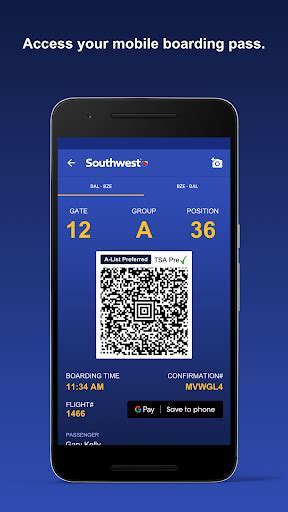
Once the clock strikes midnight (or slightly later in some cases), you can head to the Southwest Airlines mobile app or the website and:
- Tap on “View/Manage” for your upcoming flight
- Select the option for “Same Day Standby”
You may also visit the airport ticket counter or gate desk to request standby in person, though this could limit your early positioning on the standby list.
How Standby Priority is Determined
Standby priority on Southwest is influenced by several factors:
- Time of request: Earlier requests have priority.
- Fare class: Higher fare types (like Wanna Get Away Plus and Anytime) get prioritized.
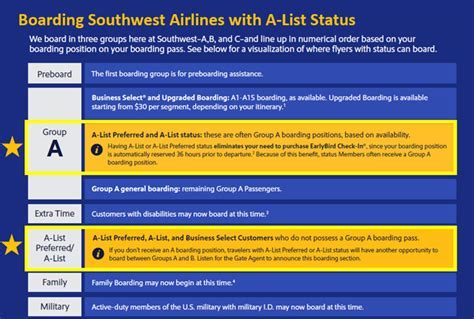
- Elite status: A-List and A-List Preferred Members get bumped higher on the list.
This means that simply being first to request standby after midnight doesn’t guarantee top position—your fare and status matter, too.
Where the Standby List Appears and How It’s Cleared
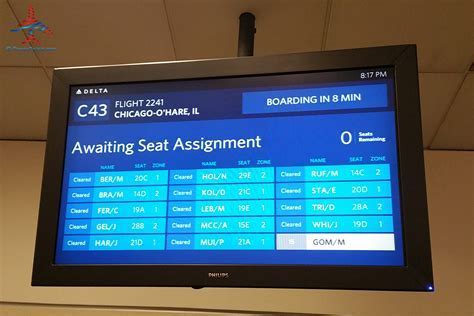
Once you’ve submitted your request, your name is added to the standby list for your selected flight. The list becomes active on the Southwest app and airport monitors once a flight is close to departure—typically between one hour to ten minutes prior to takeoff.
Critically, you must be physically present at the airport when the standby list starts clearing. If you’re not nearby when your name is called and boarding begins, Southwest will automatically bump you back to your original reservation. There is no remote confirmation of your standby seat.
Same Day Standby vs. Same Day Change
Southwest offers both Same Day Change and Same Day Standby, but they are distinctly different:
- Same Day Change provides a confirmed seat on another flight and is available only for Wanna Get Away Plus, Anytime, and Business Select fares.
- Same Day Standby is a waitlist system with no seat guarantee but is open to more fare classes depending on status.
Passengers on the basic Wanna Get Away fare are not eligible for Same Day Change but can request standby, though without priority.
Common Issues and Technical Barriers
In several cases, users on platforms such as Reddit and Flyertalk have reported technical hiccups that blocked access to the standby option. For instance:
- Linked reservations (like traveling with a companion or group) can prevent the standby request from appearing.
- App delays in recognizing the midnight time gate can result in the same-day standby button showing up hours late.
It is also important to note that you cannot cancel your standby request once submitted. However, if a seat becomes available for regular booking, you may cancel your standby request and rebook the seat directly, provided you’re quick enough.
The Reality: Do You Need to Spend All Day at the Airport?
One of the biggest concerns among travelers is whether using same-day standby means being stuck at the airport all day. The answer is nuanced. If you’re aiming to catch an earlier flight, you’ll need to:
- Request standby as soon as eligible (after midnight)
- Monitor seat availability in the app
- Arrive at the airport with sufficient time to pass security and reach the gate well before the flight boards
If your standby opportunity appears to be on a flight that departs early in the morning, it may make sense to arrive early and wait. If you’re aiming for a mid-day or evening flight, you might be able to monitor the situation remotely for a few hours before heading to the airport. But remember—if you’re not at the gate when the standby list clears, you lose your shot.
Can You Avoid Paying Extra?
One of the most appealing aspects of Southwest’s standby policy is that, in many cases, it’s completely free of charge. If you meet the eligibility criteria—especially with Wanna Get Away Plus or higher fares, or you hold A-List status—you can request standby without paying the fare difference or additional fees.
However, if you’re not eligible or want a confirmed seat instead of taking a chance, you would need to purchase a new ticket, which could run upwards of $300–$400 on short notice.
Final Strategies for Maximizing Success
To boost your chances of successfully flying standby with Southwest:
- Use the app immediately after midnight local time
- Avoid linked reservations to prevent system conflicts
- Choose flights with high open-seat availability (track in the app)
- Arrive early enough to be near the gate before the flight boards
- Consider elite status or fare upgrades if you plan to use this benefit often
Flying standby can be a smart and budget-friendly move, but only if you understand the rules, monitor your timing, and act quickly. When done right, it offers flexibility and efficiency without extra cost—something few airlines match.
Conclusion: Is Same Day Standby Worth It?
For many Southwest passengers, especially those flying on lower-cost tickets or without elite status, same day standby offers an attractive, no-risk opportunity to catch an earlier flight. It’s especially worthwhile when your plans change suddenly or when arriving earlier can make a significant difference.
The key lies in understanding the airline’s timing protocols, app behavior, eligibility rules, and gate-clearing process. With proper preparation, you can leverage this feature to your advantage—often flying earlier without paying more.