The range and bearing tool is a useful feature that connects two points on a situation display, providing vital information about the distance and bearing between them. This tool is found in all modern Air Traffic Services (ATS) systems due to its versatility, reliability, and ease of use. Depending on the specific system, it may be referred to by different names, such as RBLINE, R&B line, or QDM. Regardless of the name, its functionality remains largely the same.
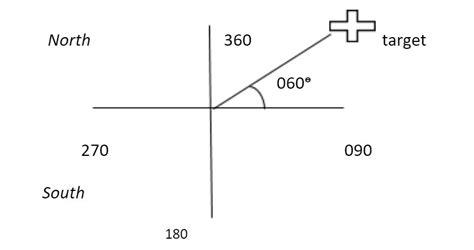
To use this tool, the controller manually activates it by selecting points of interest, which can include a point on the screen, a waypoint, a navaid, or an aircraft track. At a minimum, the system calculates the distance and bearing between the selected objects and displays this information as a small label near the connecting line. Often, additional data is also available, such as the opposite bearing (the bearing of the first object concerning the second) and a time estimate if at least one of the objects is moving, like an aircraft.
One handy feature of this tool is the “snap” function, allowing for easy selection of objects like aircraft tracks, waypoints, or navaids. With this feature, a click near an object is treated as clicking directly on it. However, while this feature is beneficial in many cases, it can sometimes restrict the controller’s ability to position one end of the line exactly where they intend. Some ATS systems even use automated range and bearing lines; for instance, when an STCA warning is triggered, a line may appear connecting the two conflicting tracks, displaying the current distance between them.
The range and bearing tool has several practical applications, including measuring distances between various points on the screen, such as waypoints, navaids, obstacles, towns, and specific points of Special Use Airspace (SUA). It can also measure the distance between an aircraft and a point to assist in estimations or determine the distance between two aircraft at the point of their trajectories’ intersection. This information can be vital for conflict detection. Additionally, it helps assess the distance between the ends of two aircraft speed vectors, such as at the Closest Point of Approach (CPA), to ensure horizontal separation.
Despite its usefulness, the range and bearing tool does have limitations. As a manual tool, its effectiveness depends heavily on the controller’s skill level. For example, when measuring distances between the tips of speed vectors, the snap feature may not be available. This limitation can lead to inaccurate perceptions of expected separation due to imprecise clicks. Even slight movements on the screen can represent significant distances in nautical miles, depending on the range being used. Accurately judging the CPA requires experience, especially when anticipating turns before trajectory intersections.
To reduce screen clutter, the displayed time is often rounded to the nearest minute, which can lead to further inaccuracies. For instance, a time difference of one minute between two aircraft heading towards the same waypoint might translate to anywhere between 4 and 10 miles, given a typical groundspeed of 420-450 knots. Therefore, it’s advisable to cross-check these readings with other tools or methods, like manual speed and distance calculations, or to prepare for the worst-case scenario.
In summary, while the range and bearing tool is a powerful asset in air traffic management, understanding its functionalities and limitations is crucial for effective use.