Changing seats before a Delta Air Lines flight can be a strategic move, especially for travelers hoping to secure a more comfortable spot or even an entire empty row. While many passengers assume that seat selection is locked in after check-in, the reality is more nuanced. With the Delta app, opportunities exist right up until just before boarding — if you know how and when to act.
Understanding Delta’s Seat Management Window
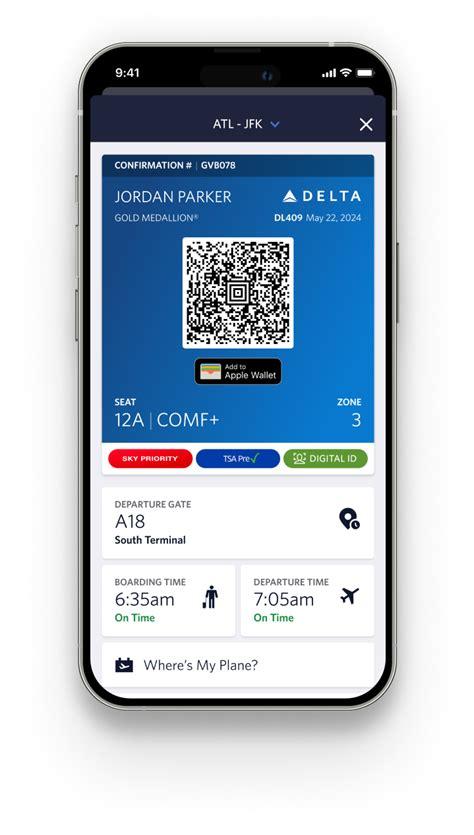
Delta Air Lines allows passengers to change their seat selections even after checking in, but the window for making changes varies based on several factors. The critical time constraint to be aware of is when the gate agent takes control of the flight, effectively locking the seat map. For domestic flights, this typically happens 45 to 60 minutes before scheduled departure, while for international flights, it can be up to 90 minutes prior.
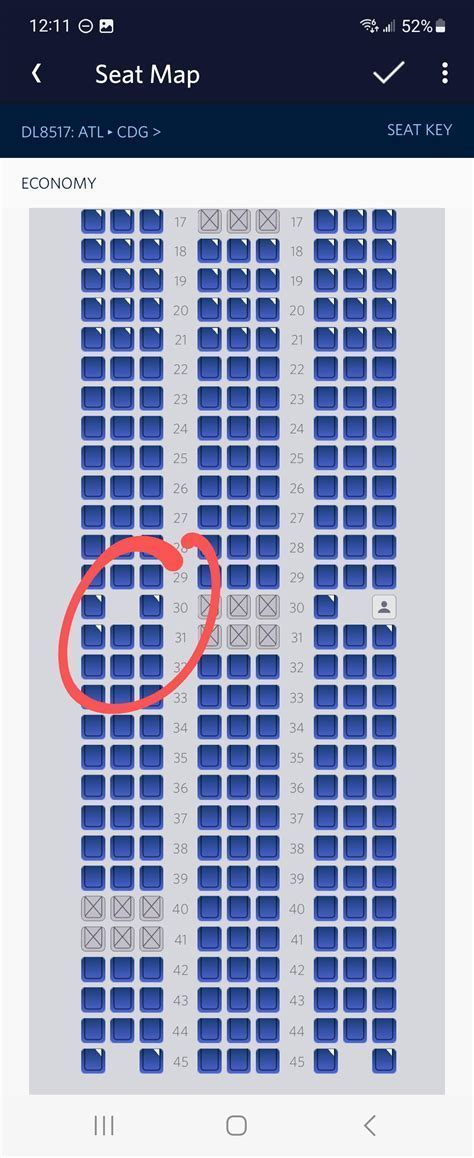
Until that lockout, passengers can freely browse the seating chart via the Delta app or website. Frequent flyers, especially those with elite Medallion status, often leverage this window to optimize their travel experience by switching to newly available premium seats or snagging aisle spots in emptier rows.
Real-World Passenger Insights: Flexibility Before the Gate Takes Control
Discussions across frequent flyer forums, such as Delta-focused Reddit threads, paint a clear picture: seat changes on the app are common and frequently successful, especially for savvy travelers who monitor seat availability close to departure. Travelers often report moving from less desirable middle seats to open aisle or window seats just minutes before the flight began boarding.
One traveler recounted changing from the back of a Boeing 757 to a front aisle seat during active boarding. Another Diamond Medallion flyer confirmed that, until the gate agent assumes control, the seat map remains live and editable on the app.
However, this window can vary by flight and crew discretion. Some agents may lock the map earlier, especially if standby passengers are being processed or upgrades are in flux. While this variability exists, the consensus remains: if the app still allows seat selection, you can make a move.
Best Practices: Maximizing the Seat Map Window
To take advantage of the pre-boarding seat shuffle, travelers should follow a few strategic tips:
- Monitor seat maps frequently in the hours before departure, especially 1–2 hours out when upgrades trigger openings.
- Refresh the app often. The seat map can change in real-time as passengers cancel, miss flights, or get upgraded.
- Don’t hesitate to switch to an aisle seat in an empty row — the middle may remain unoccupied if the flight isn’t full.
- Avoid the last-minute rush. Once the gate agent takes over, changes will no longer be possible via the app.
Caveats: App Glitches and Blocked Seats
Not all travelers will have equal access to the full seat map. A common frustration among users involves seat map glitches or blocked rows that appear full but are not. In some cases, especially after automatic upgrades from Main Cabin to Comfort+, the app may block seat changes entirely, preventing users from switching to alternative Comfort+ seats even when visibly unoccupied.
Delta’s internal logic may reserve these seats for elite status upgrades, standby assignments, or operational reasons. This sometimes leads to visibly empty seats remaining unavailable until assigned by a gate agent. In these scenarios, it’s wise to speak directly with an agent at the gate, who may have flexibility to reassign your seat manually, particularly if the seat is not truly reserved.
Elite Status: An Edge in the Seat Game
Frequent flyers with Medallion status (Silver, Gold, Platinum, Diamond) enjoy more flexibility and earlier access to preferred seating. These travelers often report being able to:
- Change seats post-upgrade more easily.
- Secure aisle or window seats as others are upgraded out of them.
- Communicate effectively with gate agents to finalize seating preferences.
Being an elite member can also increase the likelihood of scoring premium seat upgrades, further opening opportunities for strategic swaps.
Empty Row Tactics: High-Risk, High-Reward Moves
A common move among savvy Delta flyers is to relocate to an aisle seat in an empty row during the final boarding countdown, gambling that the middle seat stays empty. This tactic often pays off on less crowded flights or during off-peak travel times.
Data points from frequent travelers suggest that rear rows tend to be less popular and offer better odds for this strategy. Front-row seats are generally more coveted and thus more likely to be filled. Travelers also note that aisle seats are better than window ones in these situations, as they provide more personal space regardless of whether the middle fills.
What to Expect at the Gate
Once at the gate, the options for self-service seat changes dwindle. Gate agents now control the manifest, and any adjustments must go through them directly. However, gate agents can still be valuable allies. They often help solo travelers reposition to rows with empty middle seats or accommodate families hoping to sit together.
If you arrive early and respectfully inquire, many agents will attempt to assist you — especially if you make the case that it will result in a better overall passenger distribution or comfort. Don’t wait until the final boarding call; act as boarding groups are called.
Delta Aircraft Type and Seat Change Dynamics
Seat change dynamics also vary depending on the aircraft type. For instance, Delta’s A330-300s, wide-body aircraft often used for international routes, offer more seating variability and higher chances of available rows. Conversely, narrow-body planes like the Boeing 737 or 757 may fill up faster, reducing available options close to departure.
Larger planes tend to have greater passenger movement due to higher numbers of upgrades and no-shows. If you’re flying on a wide-body aircraft, it’s worth keeping a close eye on the app, even 60 minutes before departure, as aisle seats and premium economy zones can unexpectedly become available.
Beware of Third-Party Booking Issues
If you’ve booked your Delta ticket through a third-party travel agency or aggregator, be aware that app-based seat changes may not always be fully supported. Some travelers report that despite having a Delta confirmation number, seat maps do not populate correctly, or access to certain seating zones is restricted.
To overcome this, it’s best to link your reservation directly in the Delta app using the confirmation code. This allows Delta to treat the booking as native and may restore access to the full seat map.
Common Myths Debunked
There’s a lingering belief that once you’ve checked in, your seat is final. In practice, the opposite is true — check-in can actually unlock new opportunities as Delta begins processing upgrades and no-shows. Another common myth is that all blocked seats are occupied. In reality, many are simply held back for operational or elite status reasons and may reopen shortly before boarding.
Another misconception involves calling Delta’s customer service to change seats. Many online forums warn against using unofficial numbers posted in forums, with some travelers falling prey to scams. Always use official Delta contact methods or the app directly.
Conclusion: Stay Alert, Stay Flexible
Delta’s mobile app is a powerful tool for travelers who know how to use it strategically. The seat map remains dynamic until the final hour before takeoff, and monitoring it closely can result in a significantly more comfortable journey. Whether you’re aiming for an aisle in an empty row, upgrading to Comfort+, or escaping a middle seat, timing and vigilance are everything.
For those willing to play the game, Delta offers surprising flexibility. But you must be ready to act decisively — and sometimes speak with a gate agent to make that final move count.