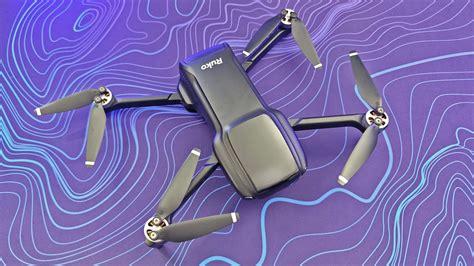
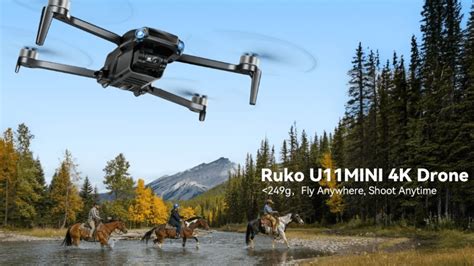
The Ruko U11MINI positions itself as an enticing gateway into the world of GPS-enabled drones, particularly for beginners seeking an inexpensive, hassle-free flying experience. With a takeoff weight of just 235 grams (8.29 oz), the U11MINI neatly skirts around FAA registration requirements in the United States, making it immediately attractive to casual flyers. However, as we explore in this in-depth review, while the U11MINI offers commendable value in terms of flight control, build quality, and ease of use, it also reveals notable compromises in camera quality and feature refinement.
A Portable Airframe with Practicality in Mind
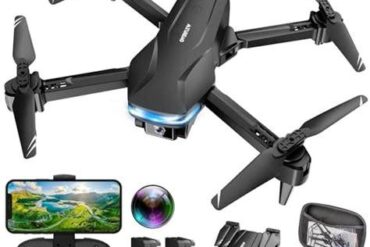
Designed for maximum portability, the U11MINI features a foldable quadcopter frame that collapses neatly into a compact, zippered carry case. This case houses the drone, a dual-battery setup, USB-C charging cables, spare propellers, and a lightweight remote controller—presenting a full starter kit at an accessible price point of $260 / £198.
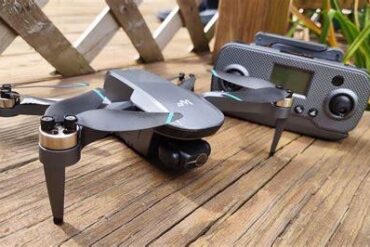
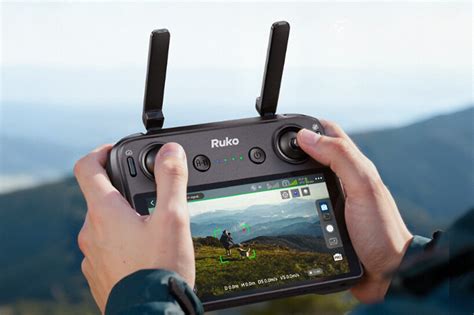
Despite the economical build, the drone’s physical structure holds up well. The plastic chassis resists minor bumps, and the controller’s ergonomic layout—featuring Return to Home (RTH), gimbal angle adjustment, and stowable control sticks—offers surprising sophistication. The extendable smartphone holder fits most phones comfortably, and physical feedback from the control inputs is crisp, with minimal latency during operation.
Flight Systems and GPS Integration
At the heart of the U11MINI is a GPS + GLONASS-based navigation system that delivers accurate positioning within ±50 cm, further augmented by a barometric sensor, optical flow sensor, and a TOF (Time-of-Flight) sensor for vertical awareness. These systems stabilize the drone for steady hovering and controlled motion, even in mild to moderate wind conditions. The manufacturer claims a wind resistance rating of Level 4 (up to 18 mph), which we confirmed to be realistic in our tests.
However, it’s worth noting that each flight session begins with a slow startup routine, requiring roughly 51 seconds for GPS pairing—this must be repeated every time the drone is powered on. While tolerable, this delay becomes noticeable during time-sensitive flight setups.
In-flight, the U11MINI is agile and responsive. Three flight modes—Cine, Normal, and Sport—allow the user to toggle between cinematic movement, standard responsiveness, and high-speed action. With a top speed of 26.6 mph, the Sport mode in particular offers satisfying control for more experienced pilots.
Battery Life and Real-World Flight Time
The Ruko U11MINI is equipped with a 2200 mAh battery, advertised as delivering up to 35 minutes of flight time. In practice, under calm wind conditions and balanced usage, we achieved closer to 20–22 minutes, which aligns with typical drone battery degradation under real conditions. Fortunately, the kit includes two batteries, enabling extended sessions without immediate recharge demands.
Recharging is handled via USB-C, a welcome upgrade from legacy micro-USB designs, and offers added convenience through compatibility with most modern power adapters.
Camera Features and Performance Under Varying Conditions
The U11MINI’s imaging system is an 8.2 MP camera capable of capturing stills in JPEG format and recording video at 4K@20 FPS, 2.7K@30 FPS, and 720p@20 FPS. These specifications appear promising at first glance, especially given the drone’s price class. However, our testing exposed considerable trade-offs in terms of image processing and footage stability.
In optimal lighting, the automatic exposure system produces images with decent clarity and color fidelity. However, without electronic image stabilization (EIS) or a mechanical gimbal, video footage tends to exhibit noticeable jitter and bumpy transitions, especially during lateral movements or moderate wind gusts. Additionally, there is evidence of over-sharpening, barrel distortion, and pincushion warping when the camera is tilted beyond neutral.
Photographic results echo similar inconsistencies. In static hover conditions and ample sunlight, images are sharp enough for casual use. But the absence of RAW support and manual camera controls limits post-processing flexibility, making this drone unsuitable for professional content creation.
Intelligent Flight Modes: Functional but Unpolished
While the U11MINI includes intelligent features like Follow Me, Waypoints, and Point of Interest (POI), these modes appear more as an introduction to what’s possible rather than fully realized tools. Tracking performance in Follow Me mode is imprecise, with delays in movement and periodic drift.
Waypoint navigation can be programmed through the companion app, but the mapping interface lacks detail and responsiveness, especially when operated in areas with limited GPS coverage. POI mode, intended to orbit a specific subject, functions reasonably well with slow rotation speeds, although keeping the subject centered consistently is inconsistent.
These shortcomings don’t render the modes unusable but underscore their entry-level nature. They serve well as training tools but fall short when compared to refined implementations seen in drones like the DJI Mini 2 SE or Potensic Atom.
Transmission and Range Reliability
The U11MINI boasts a maximum control range of 1.86 miles (3 km) under unobstructed conditions, although realistic performance maxes out around 0.9–1.2 miles before latency or video dropouts begin to occur. This is sufficient for most recreational users but still a far cry from the robust transmission systems of flagship drones.
Live video transmission is relayed through the Ruko companion app, which interfaces directly with the controller via the phone’s Wi-Fi tether. The app is functional but exhibits occasional lag, particularly in denser Wi-Fi environments, which may affect flight confidence when piloting from a first-person view.
Build Quality and Design Ergonomics
Physically, the U11MINI doesn’t feel cheap, but it doesn’t match the premium tactile feel of more expensive competitors either. The foldable arms lock into place with a satisfying snap, and the rotor guards, while optional, help beginners minimize damage from early mistakes.
The controller remains one of the highlights in terms of usability. Adjustable spring-loaded arms support larger smartphones securely, and the gimbal tilt dial enables fine vertical control, albeit with only digital cropping rather than mechanical movement. The intuitive button layout allows direct access to core functions like photo capture, video recording, and Return to Home, enhancing user confidence during live flight.
Final Verdict: Who Is the Ruko U11MINI For?
The Ruko U11MINI delivers a competent aerial experience, particularly for users prioritizing learning drone controls, understanding GPS-based navigation, and exploring entry-level autonomous flight modes. For its sub-$300 price point, the inclusion of GPS, multiple batteries, and a travel case make it a strong value proposition.
That said, it is not a drone for those seeking high-quality videography or precision autonomous features. The absence of stabilization, slow startup pairing, and unrefined software tools limit its utility in content creation or professional mapping contexts.
Its closest competition—models such as the DJI Mini 2 SE, Holy Stone HS720E, and Potensic Atom SE—offer better imaging systems and smoother software experiences, often at slightly higher prices. However, for sheer accessibility, ease of transport, and the fundamentals of GPS flight, the U11MINI performs reliably within its limits.
In summary, the Ruko U11MINI is a well-rounded, lightweight drone that provides beginners a strong foothold in the drone ecosystem, without overwhelming complexity or steep investment. It excels as a learning platform, but users seeking cinematic footage or robust automation will need to look elsewhere.