Definition
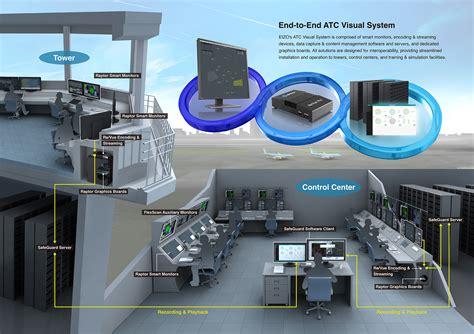
A situation display is an electronic screen that shows the position and movement of aircraft along with other necessary information. This term is often interchangeable with “radar display” or “radar screen.” Typically, it’s a large computer monitor positioned at the center of a controller’s workspace. At its core, the situation display provides essential map information, including state boundaries, air traffic service (ATS) unit details, sector boundaries, aircraft positions, identification, and level information if available. However, modern ATS systems offer even more data, such as weather conditions from ground radar, geographic locations like aerodromes and cities, active special use areas, navigation features, and additional information windows.
History
In the early days of air traffic control, these displays were known as “plan position indicators (PPI).” They had a circular shape and were directly linked to the radar system in use, without any multi-radar tracking capability. Aircraft positions were updated based on the radar antenna’s rotation. Although real-time position updates were available, geographical information was often minimal, static, and basic. With the rise of automated ATS systems, situation displays underwent significant enhancements. Raw video signals, such as PSR blips and SSR responses, transitioned into synthetic symbols derived from various surveillance sensors. Ergonomic improvements were introduced to boost controllers’ situational awareness, including color coding to filter out clutter, label shrinking for space efficiency, and customization options. The square screen (with a 1:1 aspect ratio) became the standard, though some air navigation service providers (ANSPs) now prefer widescreen formats.
Customization
Modern ATS systems allow users to customize their displays in several ways. For instance, controllers can adjust the range or scale to see farther or closer, depending on their specific roles. A planner might prefer a broader view for advanced traffic planning, while an executive controller may need a zoomed-in perspective for precision in their designated area. Picture centering has also improved; unlike early systems that focused solely on the radar location, today’s displays can be centered based on user preference. Label filtering is another useful feature, allowing controllers to suppress certain labels under specific conditions. For example, a controller managing an upper sector might choose to hide labels for aircraft remaining in lower sectors, but strict safety guidelines govern this practice. Ultimately, controllers must strike a balance between displaying adequate data and avoiding clutter, ensuring that critical information is readily available.
Benefits
The situation display is primarily used by qualified area and approach controllers. While it is often found in aerodrome control towers, it serves mainly as a reference tool rather than a basis for issuing clearances and instructions. Some tower controllers are trained to operate the surveillance system and situation display, though this is not common. Utilizing a situation display offers numerous benefits for both controllers and air traffic management. It enhances situational awareness by providing precise position data compared to relying solely on pilot reports. Real-time updates make monitoring aircraft compliance with their clearances easier, and various features alert controllers to discrepancies or potential hazards like conflicts or terrain proximity. Furthermore, flight efficiency improves as more aircraft can operate close to their optimal trajectories, increasing airspace capacity and reducing delays. Vectoring techniques often facilitate more efficient aircraft separation than altitude changes, significantly reducing separation minima compared to procedural control. Thanks to enhanced situational awareness, controllers can manage greater traffic volumes safely.