Table of Contents
- Best Operational CRM Platforms Compared
- Zoho CRM: Best for Free Lead Management
- Bitrix24: Best Free Operational CRM for Unlimited Users
- HubSpot CRM: Best for Free RevOps Management
- Pipedrive: Best Operational CRM for Sales Automation
- Insightly CRM: Best for Project Management
- monday CRM: Best for Ease of Use
- Salesforce: Best for Business Health Reporting
- Copper CRM: Best for Affordable Productivity Tools
- How We Evaluated the Best Operational CRM Platforms
- FAQs
- Bottom Line
If you’re looking to streamline your sales, marketing, and customer service processes, you’re in the right spot. The top operational CRM systems help small businesses work more efficiently by automating key parts of their operations. These platforms often include advanced features like workflow automation, helping you manage revenue operations—also known as RevOps—more smoothly.
We reviewed many platforms and narrowed the list to the top eight operational CRMs. Each was selected based on standout features, cost, scalability, ease of use, and customer feedback.
- Zoho CRM: Best overall for free lead management
- Bitrix24: Best free CRM with unlimited users
- HubSpot CRM: Best for managing revenue on a free plan
- Pipedrive: Best for automating sales tasks
- Insightly CRM: Best for project tracking and management
- monday CRM: Best for user-friendly experience
- Salesforce: Best for analyzing business performance
- Copper CRM: Best low-cost option for productivity tools
Best Operational CRM Platforms Compared
| Provider | Free Plan | Free Trial | Starting Monthly Price (Per User)* | Rating (Out of 5) |
|---|---|---|---|---|
| Zoho CRM | ✓ (3 users) | ✓ (15 days) | $14 | 4.62 |
| Bitrix24 | ✓ (Unlimited) | ✓ (15 days) | $43 (for 5 users) | 4.59 |
| HubSpot CRM | ✓ (2 users) | ✕ | $15 | 4.52 |
| Pipedrive | ✕ | ✓ (14 days) | $14 | 4.48 |
| Insightly CRM | ✕ | ✓ (14 days) | $29 | 4.37 |
| monday CRM | ✕ | ✓ (14 days) | $12 (min. 3 users = $36/month) | 4.34 |
| Salesforce | ✕ | ✓ (30 days) | $25 | 4.24 |
| Copper CRM | ✕ | ✓ (14 days) | $9 | 4.11 |
*Prices reflect annual billing rates; monthly billing is slightly higher unless stated otherwise.
Zoho CRM: Best CRM for Operations Overall With Free Lead Management
Overall Score: 4.62 / 5
- Pricing: 5.00
- General Features: 5.00
- Advanced/Niche Features: 3.75
- Help and Support: 5.00
- Expert Score: 4.13
Pros
- The free plan includes tools for generating and managing leads.
- Automation for tasks, workflows, and marketing is available across all plans.
- Offers a multi-channel platform to connect with leads via email, chat, phone, and social media.
Cons
- It has a steep learning curve due to its powerful features and many customization options.
- AI features are only included in higher-tier plans starting at $40 per user per month.
- Customer segmentation and profile enrichment tools are only in the Enterprise plan.
When to Use Zoho CRM
- You want free or low-cost AI features: Zoho CRM includes an AI voice assistant called Zia, which can automate tasks, suggest next actions, predict outcomes based on trends, and help draft email content. However, Zia is only available with higher-tier plans, starting at $40 per user monthly.
Alternative Options:
- Pipedrive’s Essential plan ($14/user/month) includes an AI Sales Assistant with automated reminders, forecasts, and tips.
- Bitrix24’s free plan gives access to its Copilot AI, which autofills deals and leads, transcribes calls, and generates quality email drafts.
- You need affordable segmentation tools: Zoho CRM limits its customer segmentation features to the Enterprise plan, which can be pricey for small businesses.
Alternative Options- HubSpot CRM includes segmentation in its free plan.
- Salesforce’s Starter Suite ($25/user/month) also offers this feature.
- Bitrix24’s Basic plan ($43 for 5 users) includes automation and segmentation—costing about $8.60 per user, making it more affordable than it first seems.
When to Consider Other Platforms
- If you’re on a tight budget but want smart features: While Zoho’s AI tools are impressive, they come with a higher cost. If you’re looking for built-in automation without the premium price, Pipedrive and Bitrix24 are strong alternatives.
- If segmentation is a priority: Businesses that depend heavily on segmentation might find Zoho’s pricing too high. Free or lower-cost plans from HubSpot or Salesforce could offer more immediate value.
Zoho CRM Pricing Plans
Free Plan
- Cost: $0 for three users
- Key Features: Manage leads, accounts, contacts, and deals. Handle recurring tasks, schedule meetings and calls, and access standard reporting. Marketing tools include campaign management and custom email templates. The home page and tabs are customizable. Basic workflow automation is included for tasks, emails, and record updates. Web forms help capture leads and contacts. Integrates with other Zoho apps like SalesIQ, Projects, Analytics, Desk, and Campaigns.
Standard Plan
- Cost: $14 per user
- Key Features: Everything in the Free plan, plus sales forecasting, calendar bookings, and lead scoring. Includes a Social Tab for monitoring interactions, custom reports and dashboards, custom fields, task reminders, and email analytics. You also get expanded Zoho integrations, including PhoneBridge and Meetings, plus third-party options via Zoho Marketplace like Google Workspace.
Professional Plan
- Cost: $23 per user
- Key Features: Adds business process management and SalesSignals for instant updates on customer actions. Includes sales gamification via Motivator for Zoho CRM, unlimited custom dashboards, email integration, and scheduled bulk emails. An inventory module supports products, pricing, and quotes. You can also use CPQ tools with guided selling and manage customer cases.
Enterprise Plan
- Cost: $40 per user
- Key Features: Builds on Professional features with territory-based forecasts, multiple scoring rules, and advanced CRM analytics like anomaly detection and cohort analysis. Offers autoresponders, Zia AI assistant for lead insights, marketing attribution, segmentation, intelligent inbox sorting, and client portals. Custom modules are available too.
Ultimate Plan
- Cost: $52 per user
- Key Features: Includes everything from Enterprise, plus increased rule limits per module (150, with 100 active). Enhances data administration and storytelling tools. Adds advanced AI/ML capabilities, deeper customizations with no-code tools, and better analytics with features like auto-generated dashboards and smart data categorization.
Zoho CRM Add-ons
- Additional File Storage: $4/month for 5GB (paid plans only)
- Additional Data Storage (up to 200 users): $4 for 100MB/month (Professional and above)
- Additional Data Storage (200+ users): $2 for 100MB/month (Professional and above)
- Data Backup: $12 per request
Note: Prices are based on annual billing and may vary with monthly plans. Always check the latest rates online.
Our Expert Opinion
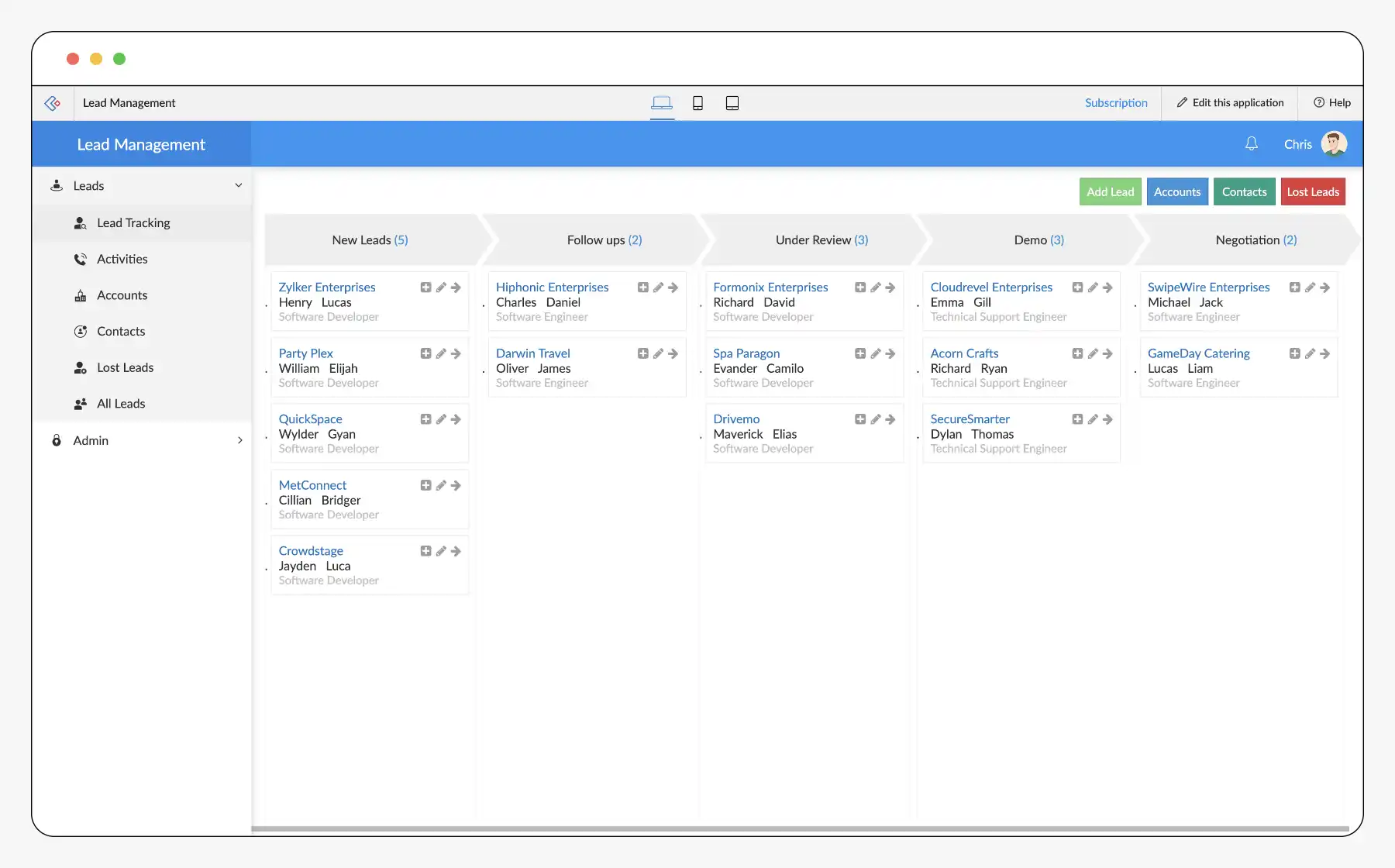
Zoho CRM’s free plan is packed with useful features for managing leads. You get tools like web forms for capturing new leads, campaign options for nurturing them, and reports to track progress. Lead sources, statuses, owners, and conversions can all be monitored in one place.
Workflow automation is included across all plans, which really helps sales and marketing teams save time. Repetitive tasks like emails, follow-ups, and updating data fields can be handled automatically.
Bitrix24: Best Free Operational CRM for Unlimited Users
Overall Score: 4.50 / 5
- Pricing: 5.00 / 5
- General Features: 5.00 / 5
- Advanced/Niche Features: 4.38 / 5
- Help and Support: 4.50 / 5
- Expert Score: 3.75 / 5
Pros
- Free plan supports unlimited users.
- Comes with duplicate detection, e-signatures, and live chat.
- Great collaboration tools, like shared calendars, internal chats, and a central company drive.
- Unlimited invoices and deal-to-invoice conversion on Basic plan.
Cons
- Interface has a steep learning curve.
- Bulk texts and emails are only on the Standard plan.
- Big price jumps between tiers.
When to Use Bitrix24
Need a free CRM for unlimited users? Bitrix24 is the top pick. Its free plan includes many advanced tools, like duplicate detection and e-signatures, which other platforms usually charge for. Live chat tools help boost customer engagement too.
Handling a lot of data? Bitrix24 gives you high storage and supports unlimited contacts and deals. It stores different types of records, such as clients, products, and projects. You also get automated duplicate detection, file editing, and custom fields.
When to Use an Alternative
Looking for something easier to use? Bitrix24’s advanced features can make the platform feel complex. If simplicity matters, monday CRM is a better fit, thanks to its user-friendly design. Copper CRM is another option with a layout similar to Google apps, making it easy to learn.
Need cheaper email marketing tools? Bitrix24 only offers bulk messaging in its Standard plan, which is $87 per month. HubSpot CRM allows bulk emails for free, which saves both time and money.
Bitrix24 Pricing Plans
Free Plan
- Cost: $0 for unlimited users
- Key Features: Manage unlimited contacts and deals, use a full sales pipeline, and track activities. Includes task planning, reminders, an autodialer, and e-signatures. CRM forms and live chat come via Contact Center. Calendar syncing and one sales pipeline are included. Ecommerce tools handle orders, inventory, and payments. CoPilot AI supports tasks, chats, and emails. Sales reporting is limited to 1,000 contacts.
Basic Plan
- Cost: $43 for five users
- Key Features: Adds five pipelines, sales tunnels, and integrations with email and telephony. Includes document templates, recurring tasks, and access to Bitrix24 Market for third-party apps. Supports 100,000 leads in reports. Enables customer segmentation, call statistics, and full-featured Contact Center.
Standard Plan
- Cost: $87 for 50 users
- Key Features: Adds project collaboration, company cloud storage, and live document editing. Includes duplicate control, recurring invoices, event planning, and video calls. Offers bulk texts and emails, analytics reports, and unlimited dashboards. Business workflows automate repetitive CRM tasks.
Professional Plan
- Cost: $175 for 100 users
- Key Features: Everything in Standard, plus automation for internal operations. Includes unlimited knowledge base, team file sharing, custom task fields, and AI scoring for deals. Unlimited open channels and canned replies are also included. Reports help track ad campaign performance.
Enterprise Plan
- Cost: From $325 for 250 users
- Key Features: Includes document search, unlimited stores and pipelines, and multi-business management. Comes with high-speed infrastructure and priority support.
Note: Pricing is based on annual billing. Monthly billing is available but costs more.
Bitrix24: Free Trial and CRM Utility Insights
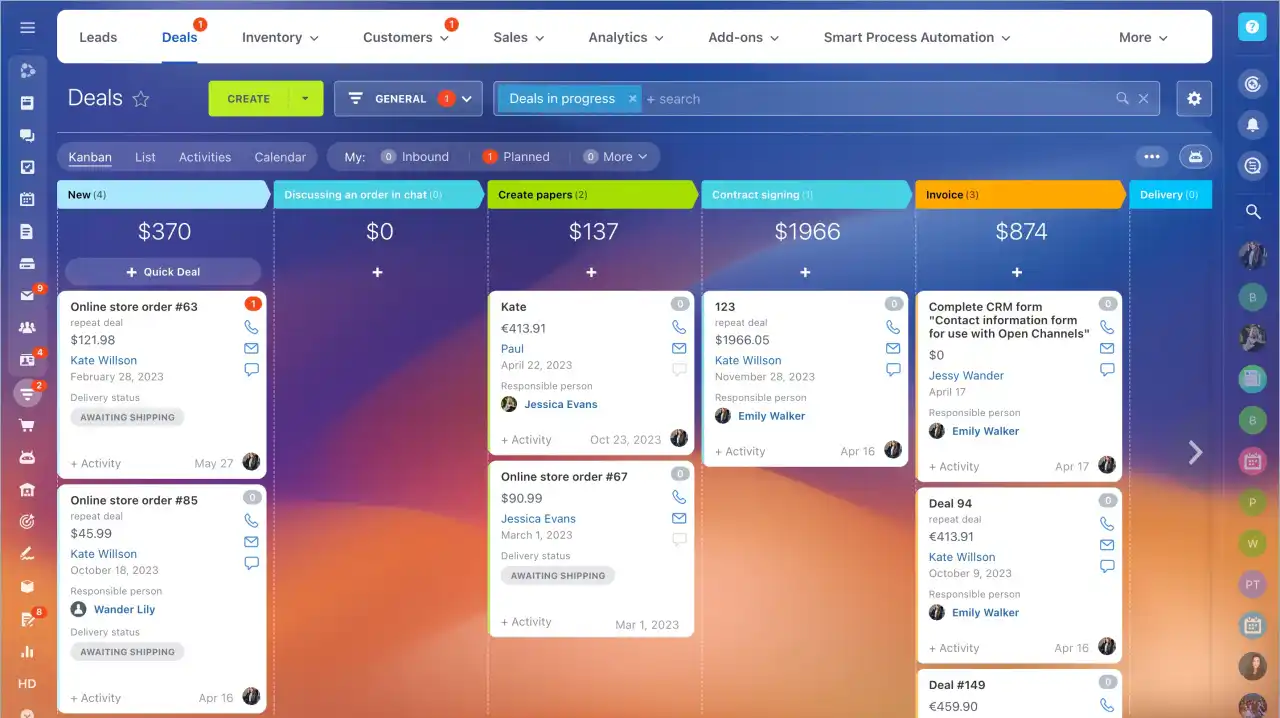
Bitrix24 offers a 15-day free trial for all paid plans. We recommend checking the official site for the most up-to-date pricing details. Bitrix24 stands out with features like duplicate detection for improved lead management, and a centralized platform supporting AI tools, e-signatures, and advanced communication features.
Our Expert Opinion
Bitrix24 is an outstanding free operational CRM for startups and small teams. It offers unlimited user access, making it perfect for growing organizations. Features like duplicate detection, integrated e-signatures, and a built-in AI assistant streamline day-to-day operations. Its collaboration tools—internal chats, calendar sharing, and task scheduling—support teamwork across departments, enabling both sales and service teams to stay aligned.
HubSpot CRM: Best for Free RevOps Management
Overall Score: 4.52 / 5
- Pricing: 4.00 / 5
- General Features: 4.38 / 5
- Advanced Features: 4.38 / 5
- Help and Support: 5.00 / 5
- Expert Score: 5.00 / 5
Pros
- Combines sales, marketing, and service features for robust RevOps
- Excellent free plan with custom quotes, Slack integration, and document storage
- Highly regarded for simplicity and ease of use
Cons
- Major price increase from Starter to Professional tier ($1,170/month)
- Sales forecasting only available in Professional plan
- No free workflow automation tools
When to Use HubSpot CRM
If your business needs an all-in-one CRM solution for RevOps (Revenue Operations), HubSpot is an ideal choice. The platform unifies sales, marketing, and customer service into one user-friendly system. You’ll find core tools like quote generation, email marketing, and appointment scheduling in the free version, along with integrations like Slack to enhance collaboration.
When to Use an Alternative
Need affordable sales forecasting? HubSpot includes this only in its Professional plan at $1,170/month for five users. In contrast, Zoho CRM offers forecasting in its Standard plan for just $14/user. If you want custom automation, HubSpot requires the same Professional plan. A more budget-friendly alternative is monday CRM, which provides low-code automation for $17/user monthly (three-user minimum).
HubSpot CRM Pricing Plans
Free Plan
- Cost: $0 for two users
- Key Features: Deal and contact management, segmented lists, email templates, quotes, Stripe payments, performance reporting, dashboards, appointment scheduling, CRM-based document storage, third-party integrations (e.g., VoIP), and service ticketing via AI chatbot.
Starter Customer Platform
- Cost: $15 per user
- Key Features: Everything in the Free plan, plus email and task automation, marketing tools (ads, forms), ACH payments, phone integration (up to 500 minutes/month), multiple pipelines, CTAs, AI content creation, and e-signature support.
Professional Customer Platform
- Cost: $1,170 for five users ($45 per additional user)
- Key Features: Adds custom revenue reporting, forecasting, advanced workflows, scoring tools, social media integrations, A/B testing, duplicate detection, automated lead assignment, and up to 10 teams.
Enterprise Customer Platform
- Cost: $4,300 for seven users ($75 per additional user)
- Key Features: Supports 100 pipelines, revenue attribution, custom event tracking, 200,000 monthly email sends, predictive lead scoring, and the ability to organize up to 300 teams. Also includes detailed revenue and renewal tracking.
Note: Prices are based on annual billing. Monthly options are available at a higher cost (except for Enterprise).
Customer Platform = Sales, Marketing, Content, Operations, Commerce, and Customer Service Hubs combined. Modules may also be purchased separately.
Our Expert Opinion
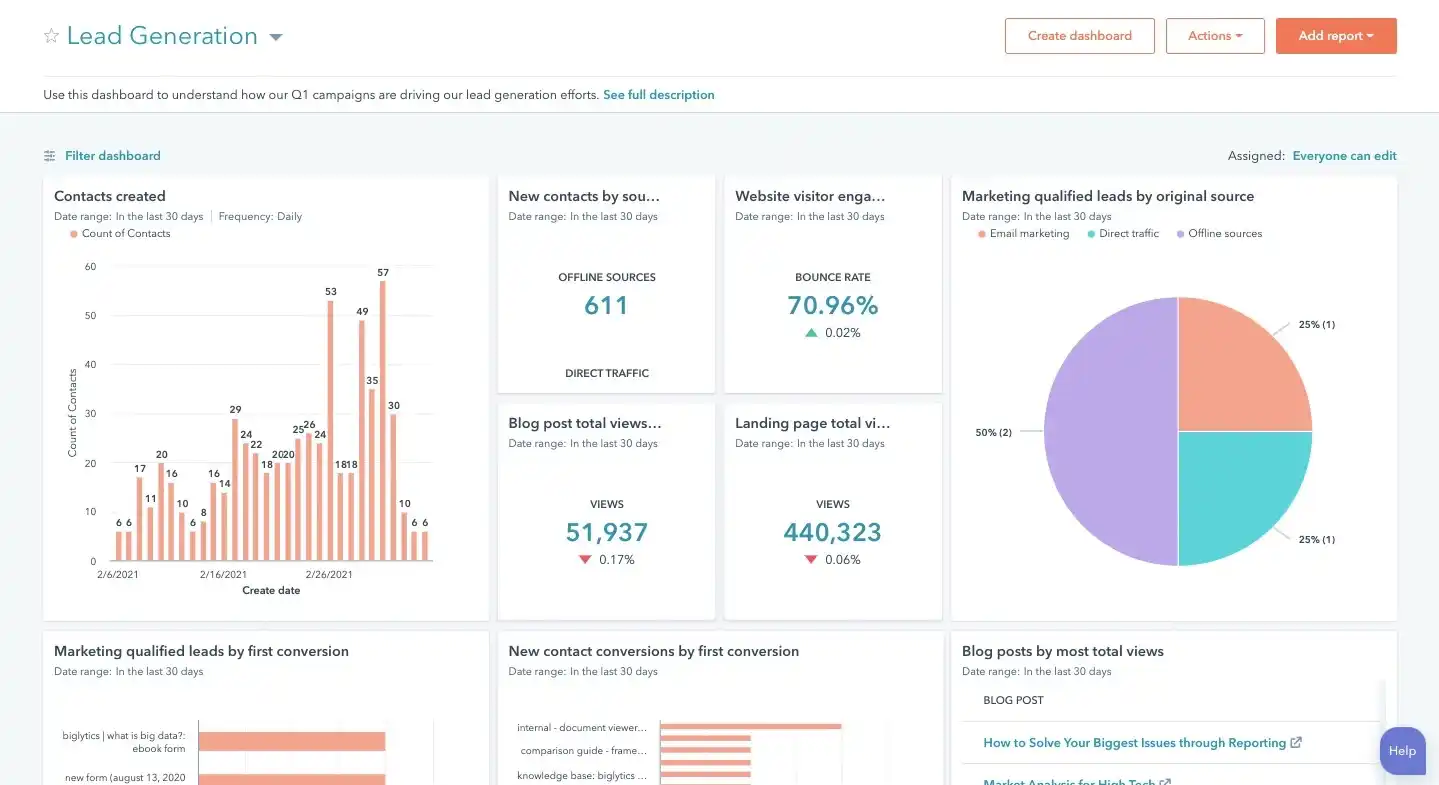
HubSpot CRM is our top recommendation for small businesses seeking a unified RevOps solution. It covers all key areas—sales, marketing, and service—with many valuable tools available at no cost. From document storage and quote creation to client meeting scheduling and email campaigns, the Free plan supports full operational workflows. While the higher-tier pricing is steep, the platform’s core features remain highly competitive.
Pipedrive: Best Operational CRM for Sales Automation
Overall Score: 4.48 / 5
- Pricing: 4.25 / 5
- General Features: 5.00 / 5
- Advanced Features: 3.13 / 5
- Help and Support: 5.00 / 5
- Expert Score: 5.00 / 5
Pros
- Excellent sales pipeline tools with tracking and automation
- Features like Smart Docs and Smart Contact streamline proposals and lead management
- Strong AI capabilities improve productivity
Cons
- No free plan, only a 14-day trial
- Project management features require the Power plan ($64/user/month) or a paid add-on
- Workflow automation and email integration are only available starting with the Advanced plan ($34/user/month)
When to Use Pipedrive
Your team focuses on automating the sales process:
Pipedrive excels at managing deals, tracking leads, and generating proposals. Tools like Smart Docs automate document creation, while Smart Contact auto-updates records, keeping your CRM accurate and efficient.
Need a free CRM? Pipedrive doesn’t offer a free-forever plan. For budget-conscious teams, platforms like HubSpot or Bitrix24 are better options. Pipedrive is best for users who want robust automation and are willing to pay for it. Therefore, if you’re bootstrapping or simply want to try out CRM software without spending money, it might be better to explore other platforms.
Alternatives: HubSpot CRM, Zoho CRM, and Bitrix24 are all solid operational CRM systems that come with freemium plans. HubSpot offers tools free forever for up to two users. Zoho CRM provides access for three users in its free version, while Bitrix24 stands out by allowing unlimited users on its freemium plan.
You want more affordable project management features:
Project management tools help streamline sales and client work from one place. Pipedrive has added a project management module, but you’ll need the Power plan, which costs $64 per user per month, to access it.
Alternative: Insightly CRM offers great value if you’re after affordable project management. It combines contact and project handling in one platform, and you can get these features in the Plus plan, which costs just $29 per user each month.
When to Use an Alternative
You need a free CRM system:
Although Pipedrive isn’t extremely expensive, it doesn’t provide a free-forever plan. If cost is a concern or you’re testing CRM tools, free alternatives may be a smarter choice.
Alternatives: HubSpot CRM and Freshsales are two strong options. Both offer freemium access, especially useful for small businesses.
You want more affordable project management features:
CRM-based project management helps track deals and client work efficiently. Pipedrive’s new module requires the Power plan, priced at $64 per user per month.
Alternatives: Bitrix24 offers built-in project management in its free plan. Insightly CRM is also a great choice for combining project and contact management in a single space.
Pipedrive Pricing Plans
Essential – $14/user
Key Features:
- Deal management with alerts and progress tracking
- AI sales assistant for task updates and forecasting
- Track company and user sales goals
- Manage leads and contacts with activity logs and document storage
- Custom fields and pipeline stages
- Product and services catalog
- App marketplace integrations
- Detect and merge duplicate data
- Commenting and tagging for collaboration
- Calendar view with activity reminders
Advanced – $39/user
Key Features:
- All Essential plan features
- Up to 30 automations with time-based steps
- Smart Contact Data for auto-enrichment
- Forecast product revenue
- Two-way email sync (Gmail/Outlook integration)
- Custom email templates and signatures
- Schedule meetings with video call options
Professional – $49/user
Key Features:
- Everything in Advanced
- Smart Docs to autofill proposals and collect e-signatures
- Visual timeline of contact history
- Manage sales teams
- Custom field-based reporting
- Automate lead and deal assignment
- Revenue forecasting views
- Team goals and performance filters
Power – $64/user
Key Features:
- Everything in Professional
- Project management (Kanban view, task tracking, custom fields)
- Phone support and onboarding assistance
- Fine-grained permission settings
- 24/7 live chat support
Enterprise – $99/user
Key Features:
- All Power features included
- Advanced security settings
- Unlimited reports and dashboards
- Extensive customization options
- 100 active workflow automations
- Manage unlimited teams
- Unlimited permission sets
- Sync up to five email accounts
Pipedrive Add-ons:
- Project Management: Included in Power and Enterprise; starts at $6.70/user monthly otherwise
- Email Campaigns: From $13.33/company monthly
- LeadBooster: Includes chatbot, live chat, prospector, forms, and scheduler; starts at $32.50/company monthly
- Smart Docs: Track proposals and contracts; free in Pro plans and higher, or $32.50/company monthly
- Web Tracking + Lead Ranking: Starts at $41/company monthly
All prices based on annual billing. Monthly billing available at a higher cost. Please check official pricing for updates.

Our Expert Opinion
Pipedrive can turn your sales process into an efficient, semi-automated system. With tools like Smart Docs, Smart Contact Data, and an AI assistant, it offers more than just workflow automation. Together, these features help automate most of your sales operations.
Insightly CRM: Best for Project Management
Overall Score: 4.37 / 5
- Pricing: 4.25/5
- General Features: 5.00/5
- Advanced/Niche Features: 3.75/5
- Help and Support: 4.50/5
- Expert Score: 4.13/5
Pros:
- Built-in project management to convert closed deals into tasks
- Strong contact management with custom fields and cloud syncing
- Mobile app sync keeps data updated in real-time
Cons:
- No free plan, only a 14-day trial
- Phone features cost extra ($35/user monthly)
- Products, pricing tools, and quotes locked in $99 Enterprise plan
When to Use Insightly CRM
You need built-in project management tools:
Insightly CRM includes a project module that helps you convert deals into actionable projects. You can customize these using fields and layouts. Pipelines and milestones improve team coordination, all starting at $29/user on the Plus plan.
You want a robust contact management system:
It provides full recordkeeping: connect contacts to companies, log communications, and update in bulk. With lead tracking and stage movement features, it supports efficient pipeline management.
You prioritize real-time data sync on the field:
For on-the-go sales, Insightly’s mobile app keeps your contact data synced live. This ensures teams always have updated info, even while away from their desks.
When to Use an Alternative
You need a free operational CRM:
Insightly doesn’t offer a free plan. For startups or larger teams, consider free CRMs.
Alternatives: HubSpot CRM gives two users free access with lead tracking. Bitrix24 is another good option with project tools and unlimited users at no cost.
You need a built-in telephone system:
If your team makes cold calls, you’ll need to pay $35/user monthly for Insightly Voice to access calling features.Alternative Option: HubSpot remains our top recommendation for operational CRM with a built-in phone system. Users can place outbound calls directly from their CRM account and either answer calls in their browser or forward them to another device. The Starter plan, priced at $15 per user monthly, includes up to 500 call minutes per account.
Insightly CRM Pricing Plans
Plus Plan – $29 per user/month
Key Features:
- Manage projects, tasks, and link contacts with organizations
- Lead, opportunity, contact, and account tracking
- Web-to-lead form capture, Kanban view, and task boards
- Batch record updates and file attachments from cloud storage
- Built-in BI dashboards with customizable reporting
- Daily limit of 2,500 mass emails, with automation and email templates
- Convert won opportunities into projects and build automated workflows
- Mobile app with real-time sync and Google Workspace integration
- Cap of 100,000 records, 10GB file storage, and 25,000 records per import
- Includes 50 custom fields, two permission roles, and two page layouts
Professional Plan – $49 per user/month
Key Features:
- All Plus plan features
- Unlimited custom profiles and page layouts
- Lead and task assignment routing
- Scheduled outbound emails
- Custom queues to auto-generate workflows and tasks
- Full workflow automation tools
- Up to 250,000 records and 100GB file storage
- Import limit of 50,000 records, send up to 5,000 emails daily
- 100 real-time insight cards and 100 custom fields
- Unlimited role-based permission options
Enterprise Plan – $99 per user/month
Key Features:
- All Professional plan features
- Up to 10,000 mass emails daily
- Unlimited customizable real-time insight cards
- Management of products, price books, and sales quotes
- Field-level access permissions
- Record capacity of 500,000 and 250GB of file storage
- 50,000 record imports and up to 200 custom fields
Insightly CRM Add-Ons
- Premier Support and Success – Personalized support, expert guidance, and technical consultation: Contact provider for pricing.
- Guided Onboarding – CRM setup, training, and consultation package: One-time cost of $1,500.
- Insightly Voice – Integrated dialer with click-to-call, call logs, call recording, and analytics (for Professional and Enterprise plans): $35 per user monthly
Note: All prices are based on annual billing cycles.
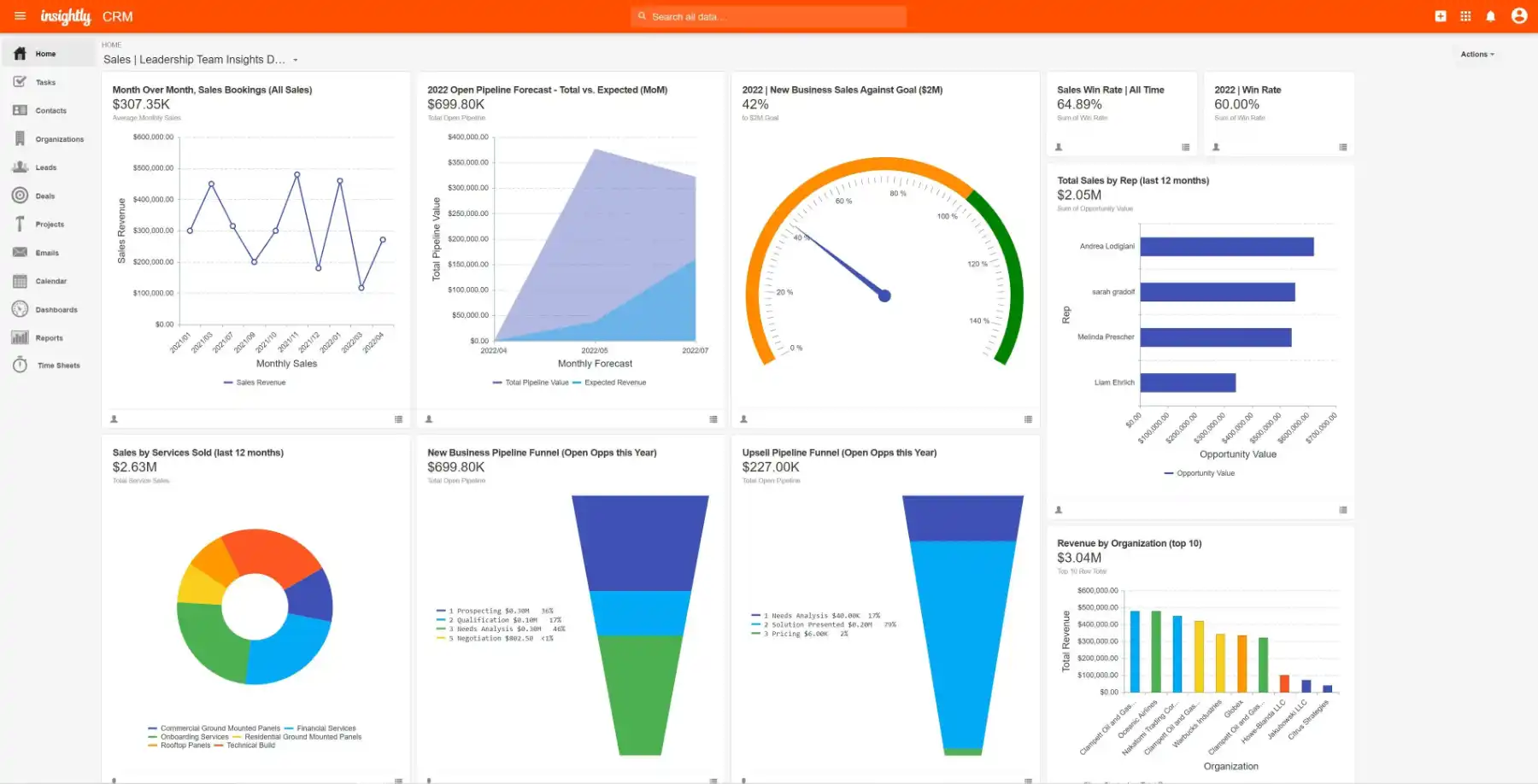
Insightly allows sales teams to build custom pipelines and convert closed opportunities into full-scale projects.
Our Expert Opinion
Insightly CRM stands out as a solid operational CRM for businesses focused on keeping project management affordable. We appreciate features like contact-organization linking, customizable fields, automation tools, lead scoring, and web form lead capture. It’s especially useful for B2B sales teams and businesses that rely heavily on client operations.
monday CRM: Best for User-Friendly Experience
Overall Rating: 4.34 / 5
- Pricing: 4.25
- General Features: 4.38
- Advanced/Niche Features: 3.75
- Help & Support: 4.50
- Expert Score: 5.00
Pros:
- Very intuitive interface using spreadsheet-style data entry
- Low-code automation for workflows
- Includes sales operations tools like rep capacity planning and onboarding tracking
- Great collaboration tools: whiteboards, file sharing/editing, task assignment with notifications
Cons:
- No free-forever plan, only a 14-day trial
- Paid plans start with a three-user minimum
- Duplicate record management and email automation locked behind higher-tier plans
monday CRM is a go-to option for teams needing a simple CRM with minimal setup. Its spreadsheet-like format makes it accessible, while various view options let users toggle between board layouts, timelines, and calendars. With low-code automation and dropdown workflows, setup is quick and efficient.
When to Choose monday CRM:
- For simple operations management: monday CRM is built to be user-friendly with its familiar spreadsheet structure, customizable fields, and visual views.
- For sales operations tools: It provides headcount planning, onboarding tools, content storage, and internal approval processes. These tools help sales teams collaborate more efficiently.
When to Consider Alternatives:
- If you need a free plan: monday CRM doesn’t offer a permanent free plan. It starts at $12 per user monthly with at least three users required. For free CRMs, consider Zoho CRM (free for 3 users), HubSpot CRM (2 users on the free plan), or Bitrix24 (free for unlimited users).
- If you need low-cost data deduplication: Data cleansing in monday CRM is limited to the Enterprise plan. Bitrix24, however, provides this on its free tier.
monday CRM Pricing Plans
Prices listed are annual, billed monthly
Basic – $12 per user/month (minimum 3 users)
Key Features:
- Unlimited storage for contacts, companies, and records
- Customizable pipelines and boards
- Dashboard creation from a single board
- Web lead capture forms
- Pre-made templates for lead, contact, account, and deal storage
- File attachments and Kanban view
- Notifications, whiteboard collaboration, and mobile app access
Standard CRM – $17 per user/month (minimum 3 users)
Key Features:
- All Basic features
- Multi-dashboard setup, timeline, and calendar views
- Full lead, contact, account, and deal tracking with activity logging
- Gmail/Outlook two-way email sync
- AI email drafting tool
- Quote and invoice generation
- Merge duplicate records
- Workflow automation and sales activity logs
- Integrations: Aircall (calls), Zoom (meetings), PandaDoc, DocuSign
- 250 automation actions per month
Pro CRM – $28 per user/month (minimum 3 users)
Key Features:
- All Standard CRM features
- Sales forecasting and analytics
- Dashboards spanning up to 10 boards
- Advanced views like charts and workload tracking
- 25,000 automation actions monthly
- Fully customizable quotes and invoices
- Email templates and e-signature customization
- Mass email engagement tracking
- Google Calendar sync
- Integrations with marketing platforms like Mailchimp, HubSpot, and Facebook Ads
Enterprise – Custom Pricing
Key Features:
- All Pro CRM features
- Advanced account tracking, onboarding, and renewal processes
- Track payments and service deliverables
- Lead scoring and duplicate data tools
- Sales goal tracking and analytics (up to 50 boards)
- Sales operations tools like rep planning and contract approvals
- Enterprise-grade data security and governance
- High-level automations and app integrations
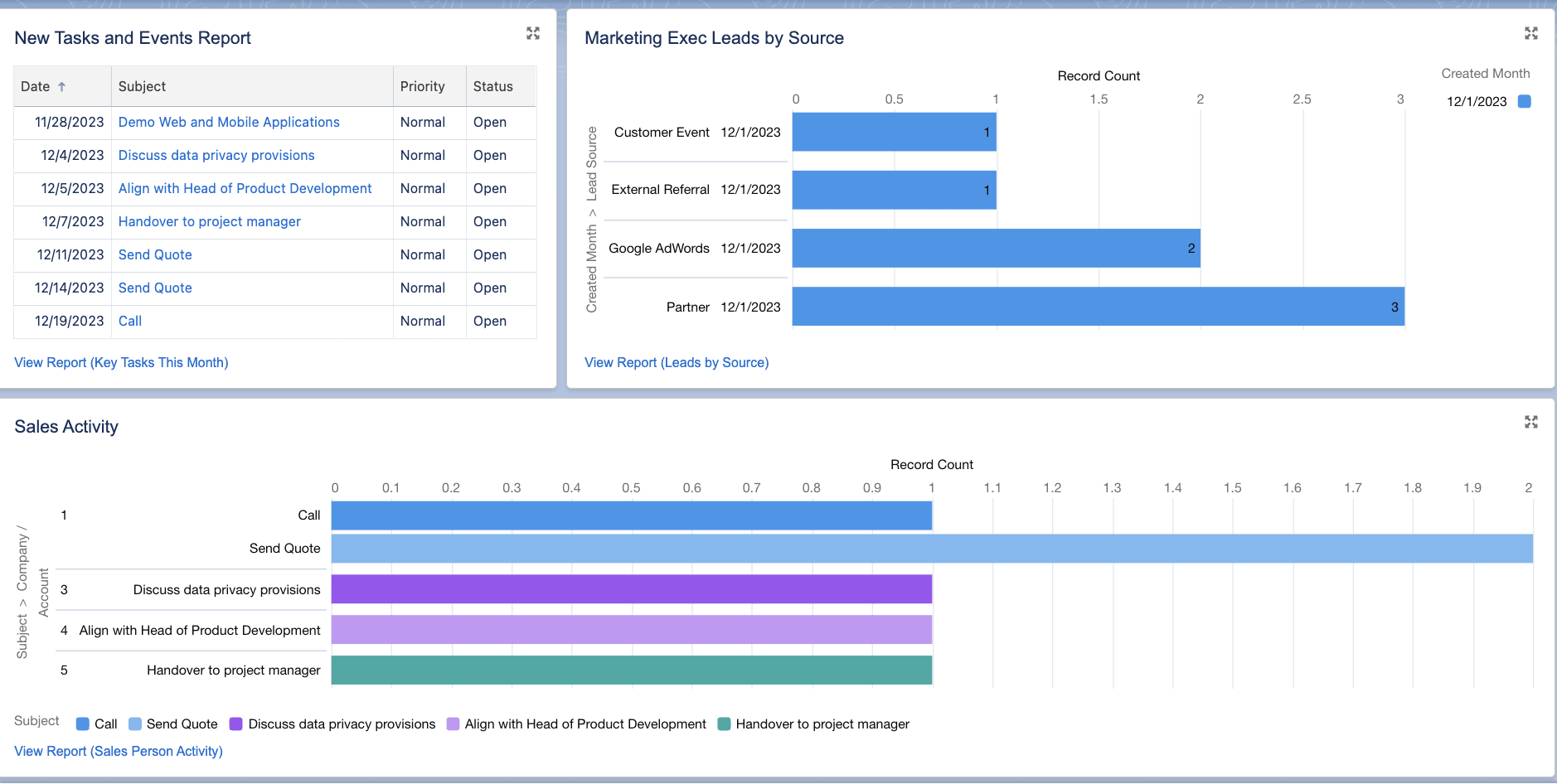
Monthly billing is available for a higher cost. While we update pricing information regularly, we recommend that our readers check the current pricing for accuracy. monday CRM makes it easy to find contacts, leads, and records using its color-coded labels, search tool, and filters.
Our Expert Opinion:
monday CRM is a top choice if product usability is your main concern. From an operational standpoint, it offers a simple database for reps to access records in a spreadsheet format that’s familiar to most users. We also highly recommend the automation capabilities. Its low-code designer tools allow users to automate sales tasks and pipeline stages, no matter their technical skill.
Salesforce: Best for Business Health Reporting
Overall Score: 4.24/5
- Pricing: 3.25/5
- General Features: 5.00/5
- Advanced/Niche Features: 3.75/5
- Help and Support: 4.50/5
- Expert Score: 4.63/5
Pros:
Customizable reports and dashboards give you real-time insights into business health. It integrates sales, email outreach, customer service, and commerce tools into one platform. Plus, it can create a payment portal and direct payment links to help boost sales productivity.
Cons:
No free plan, only a 30-day trial. There’s a significant price increase from the Starter Suite ($25 per user/month) to the Pro Suite ($100 per user/month). Forecast and quote management features are locked behind the Pro Suite plan ($100 per user/month). It also has a steep learning curve due to its advanced features.
When to Use Salesforce
You need a CRM to track business health:
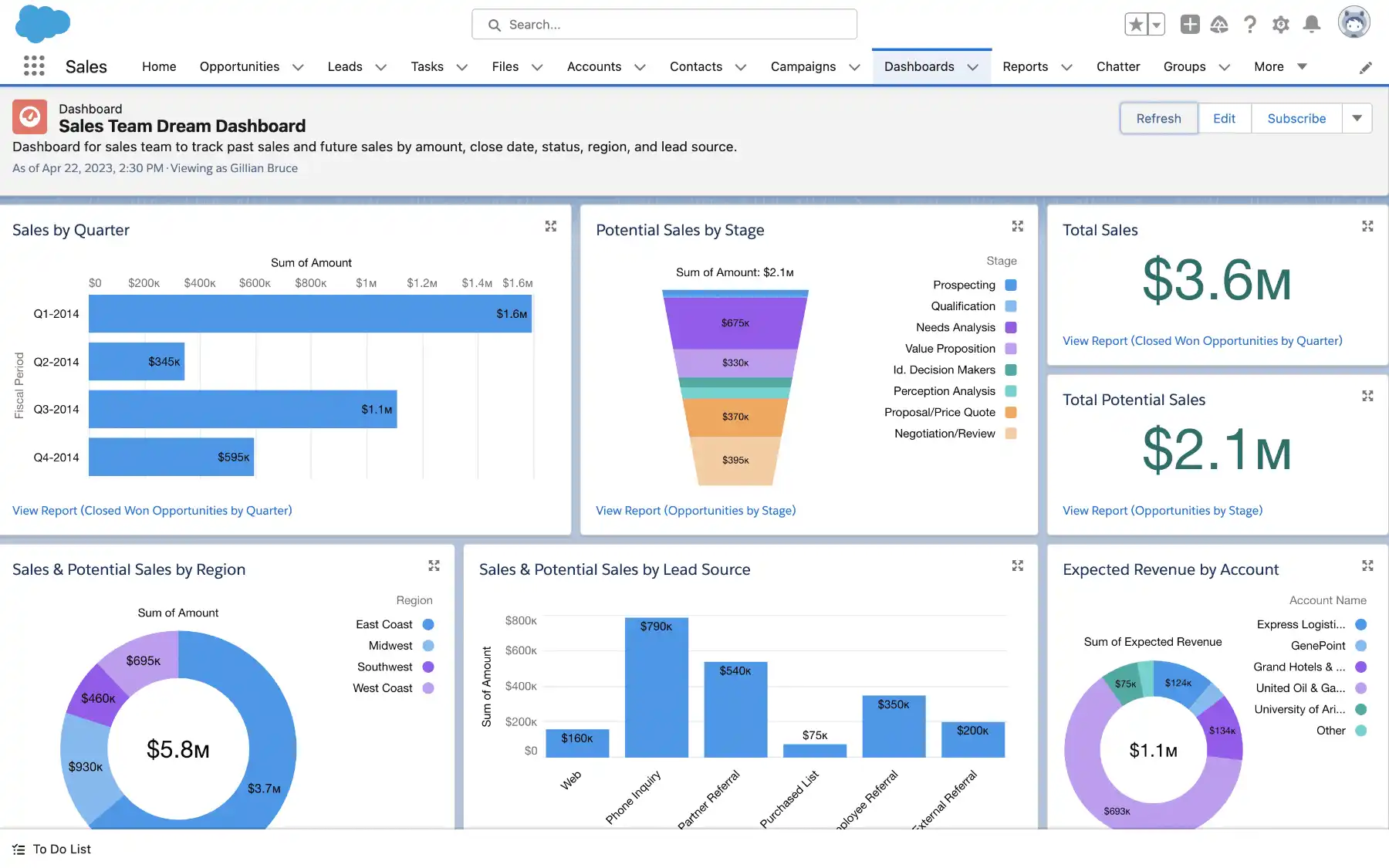
Salesforce is known for its robust reporting and analytics features. Across all plans, you get access to both pre-built and customizable reports and dashboards, providing a real-time view of your business health. These reports help monitor key success metrics such as opportunities won, sales performance, top accounts, and revenue pipeline.
You want an AI-powered CRM to manage deals:
Salesforce offers smart suggestions and next-best recommendations to help move deals through the pipeline more quickly. It also includes AI features like automated lead qualification, lead and deal scoring, and Einstein forecasting.
When to Use an Alternative
You want a free or low-cost CRM for operations:
Although Salesforce provides a 30-day trial, it doesn’t offer a freemium plan. Additionally, there’s a significant price jump from the Starter Suite ($25 per user/month) to the Pro Suite ($100 per user/month).
Alternative: Bitrix24 offers free and scalable plans for small businesses. Paid plans start at $43 per month for five users. Pipedrive is another great option, with low-cost plans starting at $14 per user/month for the Essential plan.
You’re seeking more affordable tools for forecast and quote management:
Salesforce’s sales forecast and quote management tools are part of the $100 per user/month Pro Suite plan, which might be too expensive for small businesses.
Alternatives: Zoho CRM’s Standard plan ($14 per user/month) includes sales forecasting tools, while the Professional plan ($23 per user/month) offers an inventory module with quote generation tools. HubSpot CRM also allows you to create and send quotes on its freemium plan.
Salesforce Sales Cloud Pricing Plans
Starter Suite
Cost: $25 per user.
Key Features: Custom reports, dashboards, customizable sales process, contact management, files and case management for collaboration, task management, and more.
Pro Suite
Cost: $100 per user.
Key Features: Everything in the Starter Suite, sales forecast management, enhanced pipeline visibility, create and track quotes and orders, omnichannel ticket routing, and more.
Enterprise
Cost: $165 per user.
Key Features: Everything in Pro Suite, advanced pipeline management, deal insights, embedded forecast charts, conversation intelligence, opportunity splits, workflow automation, and more.
*Pricing based on annual billing. Monthly billing for the Starter Suite is available at a higher cost. It includes a 30-day free trial. While we strive to keep pricing information updated, we suggest checking the current pricing. Salesforce helps track sales and revenue across all business operations.
Our Expert Opinion
Salesforce’s ready-made, customizable reports and dashboards offer an accurate, real-time view of your business health. AI-powered insights help pinpoint areas where your business may be struggling, allowing you to take immediate action to meet your revenue goals. It’s more than just a sales CRM; it integrates marketing, service, and commerce tools to create a seamless experience for your customers.
Copper CRM: Best Operational CRM Software for Affordable Productivity Tools
Overall Score: 4.11/5.
- Pricing: 4.25/5
- General Features: 4.38/5
- Advanced/Niche Features: 3.44/5
- Help and Support: 4.00/5
- Expert Score: 4.50/5
Pros:
Users can access this CRM for only $9 per user/month through their Gmail or Google Calendar interface. It includes great team collaboration tools like file sharing, task assignments, and user comments/mentions. The interface is intuitive and resembles Google apps.
Cons:
No free plan, only a 14-day free trial. There are tier-based limits on contacts and custom fields. The mass email feature is only available in the Professional plan ($59 per user/month).
When to Use Copper:
You need affordable productivity tools:
Copper CRM is designed to integrate seamlessly with Google apps, providing users access to the CRM directly from Gmail or Google Calendar. This makes it easier for sales reps to update records, manage tasks, and find files.
You need a simple team collaboration tool:
Copper CRM’s interface is highly intuitive, and it also offers useful collaboration features. Users can mention one another in records, assign tasks, share files, and log activities, ensuring that sales teams coordinate effectively on opportunities.
When to Use an Alternative
Need a lot of custom data fields:
Copper CRM limits you to just 10 customizable data fields on the Basic plan. To unlock unlimited custom fields, you need the Professional plan at $59 per user per month.
Alternative: Bitrix24 offers unlimited custom data fields on its free plan, allowing you to fully customize without any restrictions.
Want free access to mass emailing capabilities:
Copper CRM only includes mass emailing in its Professional plan, which costs $59 per user per month—a higher price than other options.
Alternative: HubSpot CRM provides a free-forever plan that includes bulk emailing, email templates, and more.
Copper CRM Pricing Plans
| Plan | Cost | Key Features |
|---|---|---|
| Starter | $9 per user | Productivity tools like notes, reminders, team collaboration, activity feed, Google Chrome extension, Google Workspace integrations (except Google Sheets), 1,000 contact limit, up to 10 custom data fields, tasks plus activity feed, email templates, Zapier integration, online forms, mobile apps for iOS and Android, and live chat support. |
| Basic | $23 per user | All Starter plan features, notes, file storage, activity logging, custom sales pipelines, task automation, contact enrichment, project management tools, 2,500 contact limit, email, contact, and file sync. |
| Professional | $59 per user | All Basic plan features, 15,000 contact limit, activity and pipeline reports, unlimited custom fields, bulk email, email automation, email open tracking, team permissions, workflow automation, Google Sheets integration, integrations with tools like DocuSign, Mailchimp, QuickBooks, Slack, personal onboarding, and premium support. |
| Business | $99 per user | All Professional plan features, email click tracking, email series, unlimited contacts, lead scoring, custom reports, website tracking, removal of Copper branding, LinkedIn integration, web forms, ad integrations with Facebook, Wix, and WordPress. |
Pricing is based on annual billing per user. Monthly billing is available at a higher cost. Be sure to check current pricing for updates.
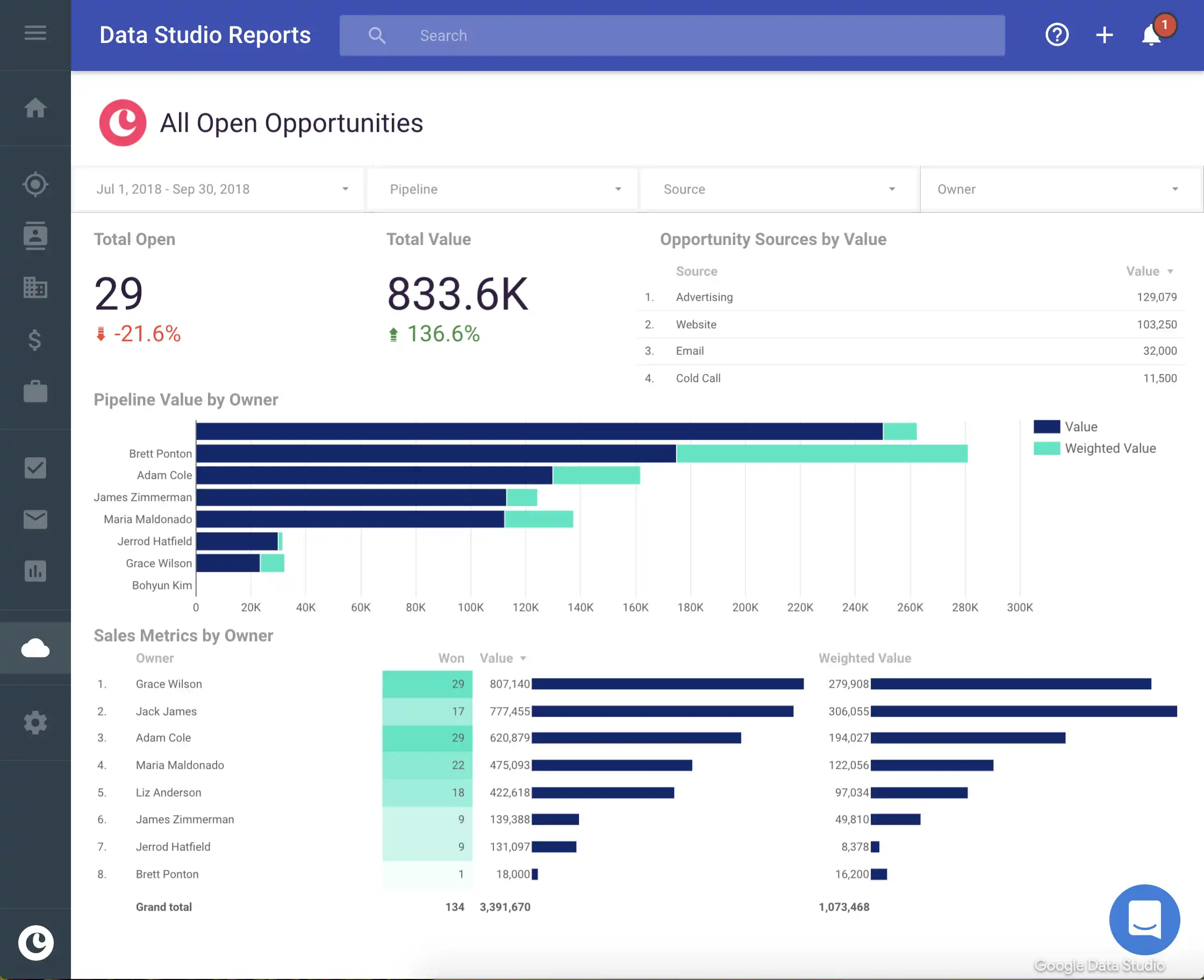
Copper CRM’s Google Chrome extension is a standout tool. Sales reps can manage CRM records directly from Gmail or Google Calendar, streamlining their workflow.
Our Expert Opinion
Copper CRM stands out for its seamless Google Chrome extension, enhancing productivity by allowing sales reps to manage their CRM tasks directly from Gmail and Google Calendar. This integration ensures that everything stays organized and within reach, saving time and reducing the need for switching between apps.
How We Evaluated the Best Operational CRM Platforms
We assessed the best operational CRM platforms by evaluating essential features for improving sales team efficiency and day-to-day operations. Key features included forecasting, internal communication tools, and task automation. We also considered general CRM attributes like price, user experience, and customer support.
Breakdown of Criteria:
- General Features (25%): We reviewed features like mobile apps, third-party integrations, system customization, and reporting tools.
- Advanced or Niche Features (20%): We focused on niche features, such as workflow automation and task management tools. These features help sales teams stay productive and scale efficiently.
- Pricing (20%): We considered the overall cost-effectiveness of each CRM, including available free trials, freemium plans, and flexible billing options.
- Help and Support (20%): We valued CRM systems with solid customer support, offering multiple channels like live chat, email, and phone, along with self-service resources.
- Expert Score (15%): Based on our experience and online reviews, we assessed the system’s usability, value, and scalability.
Frequently Asked Questions (FAQs)
How does an operational CRM system work?
An operational CRM system improves productivity and organization by automating workflows, tracking tasks, and providing tools for internal communication and collaboration. It also supports sales and revenue forecasting for better decision-making.
What are the three types of CRM systems?
The three types are operational, collaborative, and analytical CRMs. Operational CRMs focus on automating sales, marketing, and customer service. Collaborative CRMs improve cross-department coordination. Analytical CRMs provide insights into customer behavior and sales activity to refine strategies.
Why choose operational CRM?
Choose an operational CRM to automate your daily tasks, improve collaboration, and streamline customer interactions. It helps you launch marketing campaigns quickly and integrates with other business apps to boost efficiency.
What is the difference between operational and analytical CRM?
An operational CRM focuses on automating sales and customer service processes, while an analytical CRM helps uncover customer insights for strategic decision-making.
Bottom Line
Operational CRMs improve the productivity and efficiency of sales teams with tools for data management, automation, forecasting, and collaboration.Improve your day-to-day business operations by selecting the best operational CRM that fits your budget, feature needs, and interface preferences. For instance, monday CRM is highly praised for its user-friendly design, while Pipedrive excels at automating your sales tasks. Zoho CRM stands out for its free lead management tools, making it a top choice.