Flight Mode Annunciator (FMA)
Definition
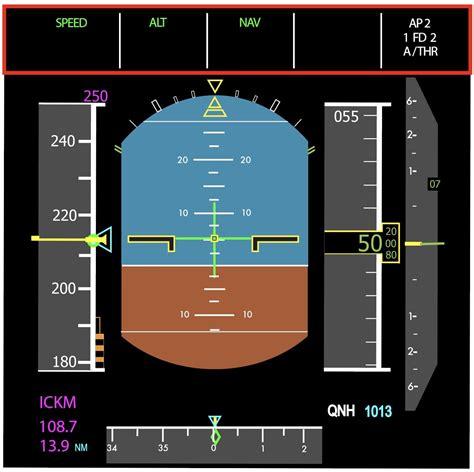
In modern aircraft with integrated automatic flight systems, the Flight Mode Annunciator (FMA) shows the status of selected vertical and lateral flight modes, along with thrust settings.
Description
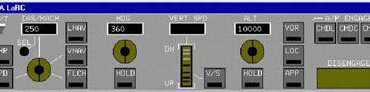
The FMA is typically found at the top of the Primary Flight Display (PFD). It indicates which flight modes are active or armed. Pilots usually make these selections on the aircraft’s Guidance Panel. It’s important for pilots to check the FMA after making a selection to confirm that the system is working correctly. Simply put, pilots instruct the aircraft on what they want it to do using the Guidance Panel and controls like the Go-Around buttons. In turn, the aircraft communicates its actions and intentions through symbols displayed on the FMA.
FMA indications are color-coded. For instance, an active status is commonly shown in green, while an armed status may appear in white or blue. Multiple statuses can be displayed for one mode. If an aircraft is flying a specific heading and the autoflight system is set to intercept an Instrument Landing System (ILS) approach path, HDG will show as an active lateral navigation mode. Simultaneously, LOC for localizer will appear as an armed status. Once the aircraft captures the inbound course, LOC will switch to green, indicating successful capture of the localizer.
The abbreviations and acronyms used for FMA indications can differ by manufacturer. Lateral navigation modes can be based on a selected heading, guidance from the aircraft’s Flight Management System (FMS), or ground-based radio navigation aids. For example, HDG indicates heading mode, LOC represents localizer guidance, and LNAV signifies FMS-derived lateral navigation. Different colors may indicate various navigation types, such as magenta for GPS-based navigation and green for radio-based navigation.
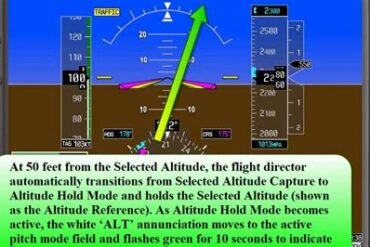
Other lateral modes include ROLL, which signifies the default wings-leveling mode when there’s no navigational guidance available. Vertical modes are also indicated, such as ALT for Altitude Hold, which maintains a set altitude during level flight. If climbing at a set airspeed, FLCH indicates Flight Level Change, while climbing at a specific vertical speed, like 1,000 feet per minute, is shown as VS for Vertical Speed. When the aircraft captures the ILS glideslope, GS displays as active.
Vertical modes may also include VPATH, which is used to maintain a constant descent through GPS waypoints. This is often utilized when the aircraft is cleared to “descend via” a Standard Instrument Arrival. The crew sets the lowest altitude for the arrival on the Altitude Selector, and the system calculates the descent, considering any intermediate altitudes.
The FMA also displays autothrottle thrust mode settings. For example, if a pilot opts to descend at a specific speed with idle power, the FMA might show SPDE, meaning “Speed on Elevator.” This indicates that speed is controlled by the aircraft’s pitch angle. Conversely, if a pilot chooses to descend at a given vertical speed, like 1,000 feet per minute, the FMA may indicate SPDT, meaning “Speed on Thrust,” where speed is regulated by thrust setting. Depending on the manufacturer, other autothrottle modes may include GA for go-around thrust, RETD for throttles in retard mode during touchdown, and OVRD for manual override by a pilot moving the thrust levers.